.jpg)
BSNL DLT Registration 2026: Complete Step-by-Step Guide with Login & Charges
Quick Registration Summary:
- ⏱️ Approval Time: 48-72 hours (3 working days)
- 💰 Registration Fees: ₹3540 (approx)
- 📋 Documents Required: PAN Card, GST Certificate, Business Registration, Address Proof
- 🔗 Official Portal: https://www.ucc-bsnl.co.in/
- Telemarketer id: 1302157243747322354
- 🔄 Annual Renewal: Required (similar fees apply)
What is BSNL DLT Registration?
BSNL DLT registration refers to the mandatory process of registering your business entity on BSNL's Trubloq platform—a blockchain-based Distributed Ledger Technology system. Operated by Bharat Sanchar Nigam Limited (BSNL), one of India's largest telecom service providers, this platform ensures compliance with TRAI's TCCCPR 2018 regulations for commercial SMS communications.
Unlike DLT registration, which is completely not free, BSNL DLT charges a nominal fee but offers robust infrastructure backed by India's government telecom network. The DLT BSNL platform, also known as BSNL Trubloq, maintains transparent records of every commercial message, preventing spam and unauthorized template misuse.
👉 Get Free DLT Support | 👉 Talk to Bulk SMS Expert | 👉 Start Sending SMS Now
Contact SMSGatewayHub:
📞 Call: +91-9907922122
📧 Email: support@smsgatewayhub.com
🌐 Visit: www.smsgatewayhub.com
Why BSNL DLT Portal Registration is Mandatory
The Telecom Regulatory Authority of India (TRAI) introduced DLT registration to combat the massive spam problem—with approximately 1.5-1.7 billion commercial SMS sent daily across India. Here's why bsnl dlt registration matters:
✅ Legal Compliance: Avoid penalties and message blocking
✅ Brand Protection: Prevent unauthorized use of your sender ID
✅ Message Delivery: Ensure 100% delivery without operator filtering
✅ Customer Trust: Build credibility through verified communications
✅ Regulatory Transparency: Complete traceability from sender to recipient
Important: Without completing dlt registration bsnl, your SMS will be blocked by all telecom operators, regardless of which bulk SMS provider you use.
BSNL DLT Registration Charges 2026
Understanding dlt registration charges helps you budget accurately for compliance:
| Registration Type | BSNL Charges | Validity Period | Renewal Cost |
|---|---|---|---|
| Entity Registration | ₹3540 | 1 Year | ₹3540 |
| Header Registration | Included | As per entity | No separate fee |
| Content Template | Free (unlimited) | Perpetual | Free |
| PE-TM Chain Binding | Free | Active until modified | Free |
| CTA Whitelisting | Free | Perpetual | Free |
Comparison with Other Operators:
SMSGatewayHub is a complete Bulk SMS and SMS API solution provider designed to support businesses at every step.
Who Needs BSNL DLT Portal Registration?
Principal Entity (PE) - Must Register If:
- Operating e-commerce businesses (order updates, promotional offers)
- Running banks/NBFCs (transaction alerts, OTP messages)
- Managing educational institutions (admission alerts, exam notifications)
- Healthcare providers (appointment reminders, health alerts)
- Government departments (citizen notifications, service updates)
- Startups and SMEs (marketing campaigns, customer engagement)
- Any organization sending promotional or transactional SMS
Telemarketer (TM) - Must Register If:
You're an SMS service provider sending bulk messages on behalf of clients:
- TM-Aggregator (TM-AF): Intermediate service provider between PE and TM-Delivery
- TM-Delivery (TM-DF): Direct message submission to BSNL network
Key Difference: PEs send messages for their own business, while TMs send messages on behalf of multiple clients.
Prerequisites: Documents Required for BSNL DLT Registration
Before starting the dlt registration process, collect these documents:
For Companies/LLP/Private Limited:
📄 Mandatory Documents:
- Company PAN Card (original copy)
- GST Registration Certificate
- Certificate of Incorporation (COI)
- Registered office address proof (utility bill/rent agreement)
- Authorized signatory's PAN + Aadhaar
- Board resolution or authorization letter on letterhead
- Active mobile number & email ID for OTP verification
- Telemarketer ID -1302157243747322354
For Proprietorship/Individual:
📄 Mandatory Documents:
- Proprietor's PAN Card
- Aadhaar Card (for identity proof)
- Business address proof (electricity bill/rent agreement)
- GST Certificate (if turnover > ₹40 lakhs)
- Udyam/MSME certificate (if applicable)
- Cancelled cheque or bank statement
- Shop & Establishment license (if applicable)
-
Telemarketer id: 1302157243747322354
For Partnership Firms:
📄 Mandatory Documents:
- Partnership deed
- Firm PAN Card
- GST Certificate
- All partners' ID proof (PAN/Aadhaar)
- Address proof of business premises
- Authorization letter for primary user
- Telemarketer ID
Pro Tip: Ensure all documents show the exact same business name as registered on PAN. Any mismatch leads to instant rejection.
Click now -Free BSNL DLT Registration Support – Get Help Now
Step-by-Step 
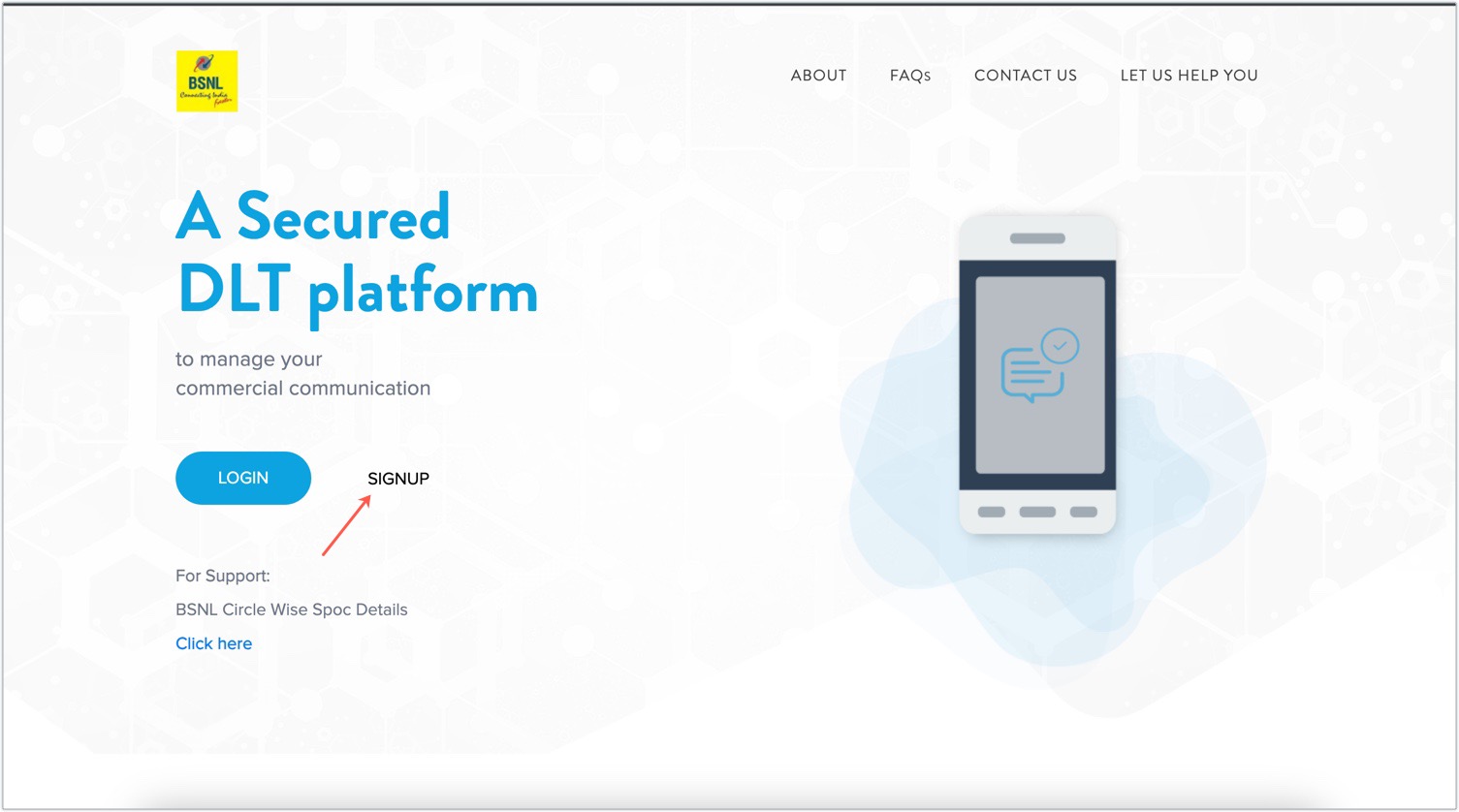
Go to the BSNL DLT registration page and click "Sign Up."
Choose a region of operation: As a business. If you've used other mobile network carriers before, choose No.
Enter in your business PAN number and then click Verify and Continue.
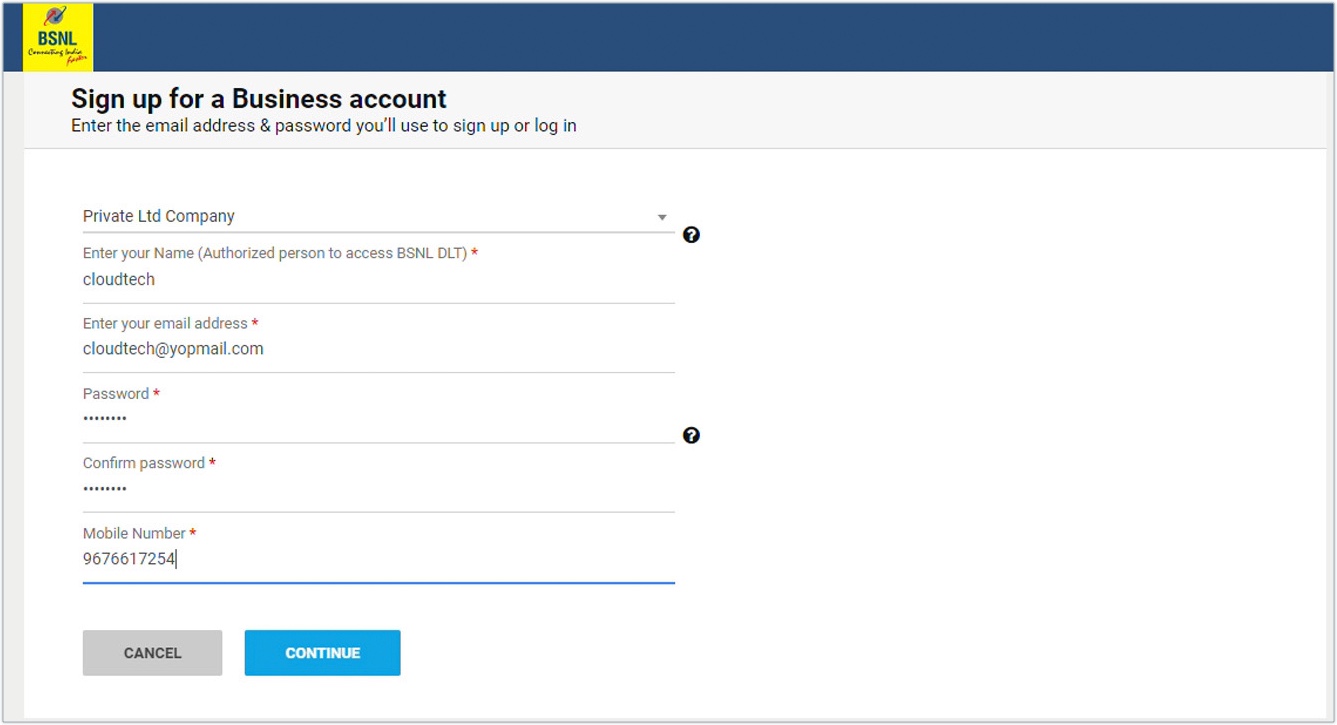
Sign up for BSNL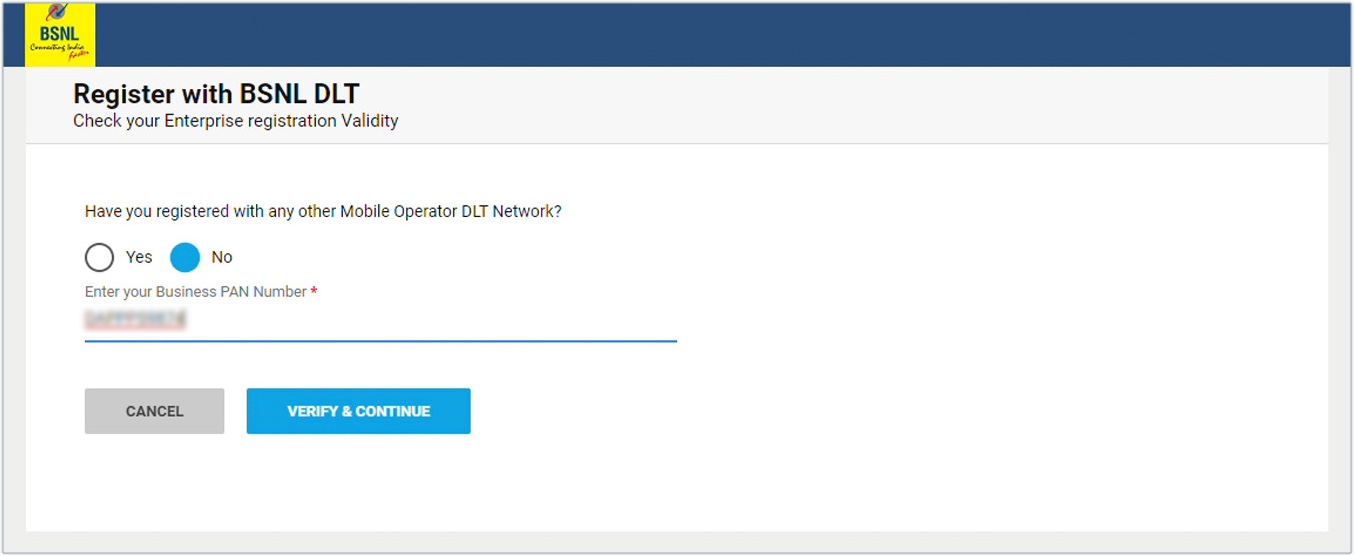
Please fill out the following information:
Choose what kind of business you want to run.
Please type in your name and email address, ideally one that ends with your company's domain.
Enter your phone number and set a password.
Fill Primary User Details
Create your bsnl dlt login credentials:
-
Personal Information:
- Full name (as per PAN/Aadhaar)
- Designation in company
- Mobile number (will be used for OTP verification)
- Email address (primary communication channel)
-
Create Password:
- Minimum 8 characters
- Must include uppercase, lowercase, number, special character
- Example:
Bsnl@2025
-
Verify Contact Details:
- Enter OTP received on mobile
- Verify OTP received on email
- Both verifications mandatory
Important: This email and mobile will be your permanent bsnl dlt login credentials. Keep them secure and accessible.
Complete KYC & Business Details
Section A: Business Information
- Registered business name (exactly as per PAN)
- Business address (registered office)
- PIN code (will auto-fill state/city)
- Business category (select from dropdown):
- Banking/Finance
- E-commerce/Retail
- Education
- Healthcare
- Real Estate
- Technology/IT
- Government
- Others
Section B: Contact Person Details
- Primary contact person name
- Designation
- Contact mobile number
- Contact email ID
Section C: Business Communication Address
- If different from registered address
- Correspondence PIN code
- Landmark (optional)
Setting up a BSNL business account
Type in the OTP and click "Verify." You will get a link to verify. Click that and finish the verification procedure. Press Continue.
kind in your company's name, kind of business, business category, PAN, your name, and the address of your firm. Press Continue.
Send in proof of business identification, proof of business entity, a letter of authorization, and the name of the person who is allowed to sign. Press Continue.Proof of BSNL submittal
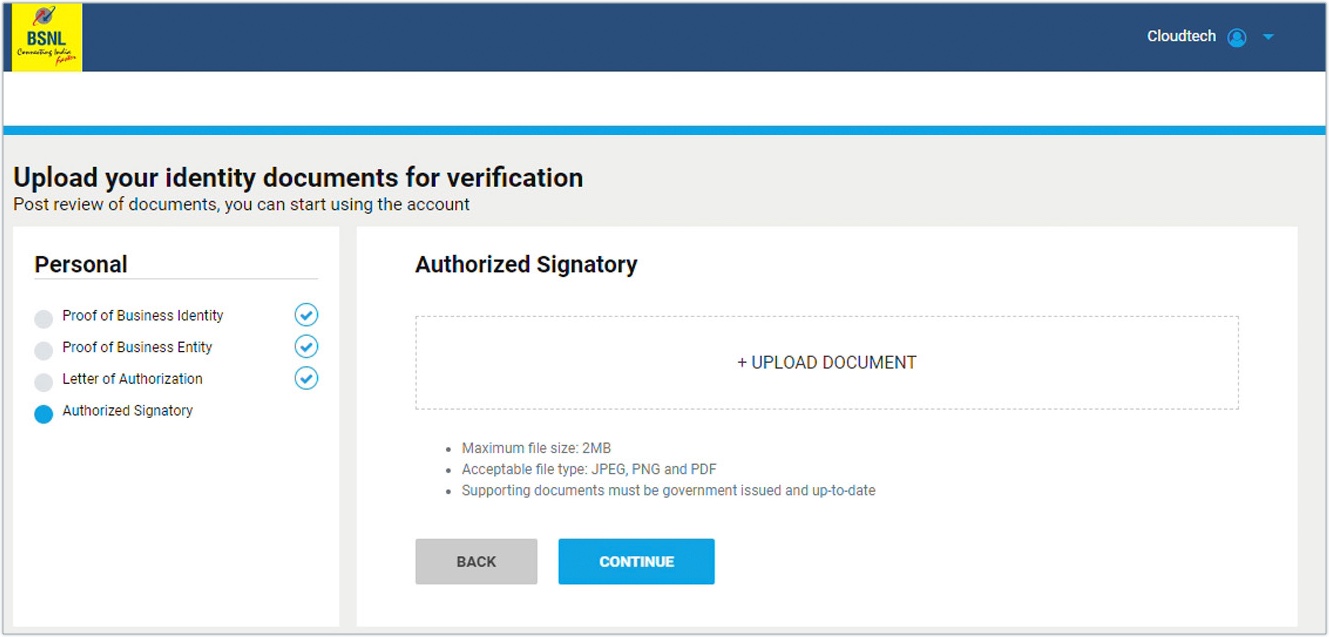
Upload KYC Documents
Navigate to Document Upload Section:
| Document Type | Format | Max Size | Mandatory |
|---|---|---|---|
| PAN Card | PDF/JPG | 2 MB | Yes |
| GST Certificate | 2 MB | Yes (for companies) | |
| Incorporation Certificate | 2 MB | Yes (for companies) | |
| Address Proof | PDF/JPG | 2 MB | Yes |
| Authorized Signatory ID | PDF/JPG | 2 MB | Yes |
| Authorization Letter | PDF (on letterhead) | 2 MB | Yes |
Document Quality Checklist:
✅ All four corners visible
✅ Text clearly readable
✅ No watermarks or stamps covering critical info
✅ Colored scans preferred over black & white
✅ PDF format preferred for certificates
Common Rejection Reasons:
❌ Blurred or low-resolution scans
❌ Cropped documents missing edges
❌ Name mismatch between documents
❌ Expired documents (address proof older than 3 months)
❌ Missing signature/seal on authorization letter
Pay the registration cost and make an account.
In 48 hours, someone will go over your account and activate it. You will get an email with the information you need to activate your account when the evaluation process is over. 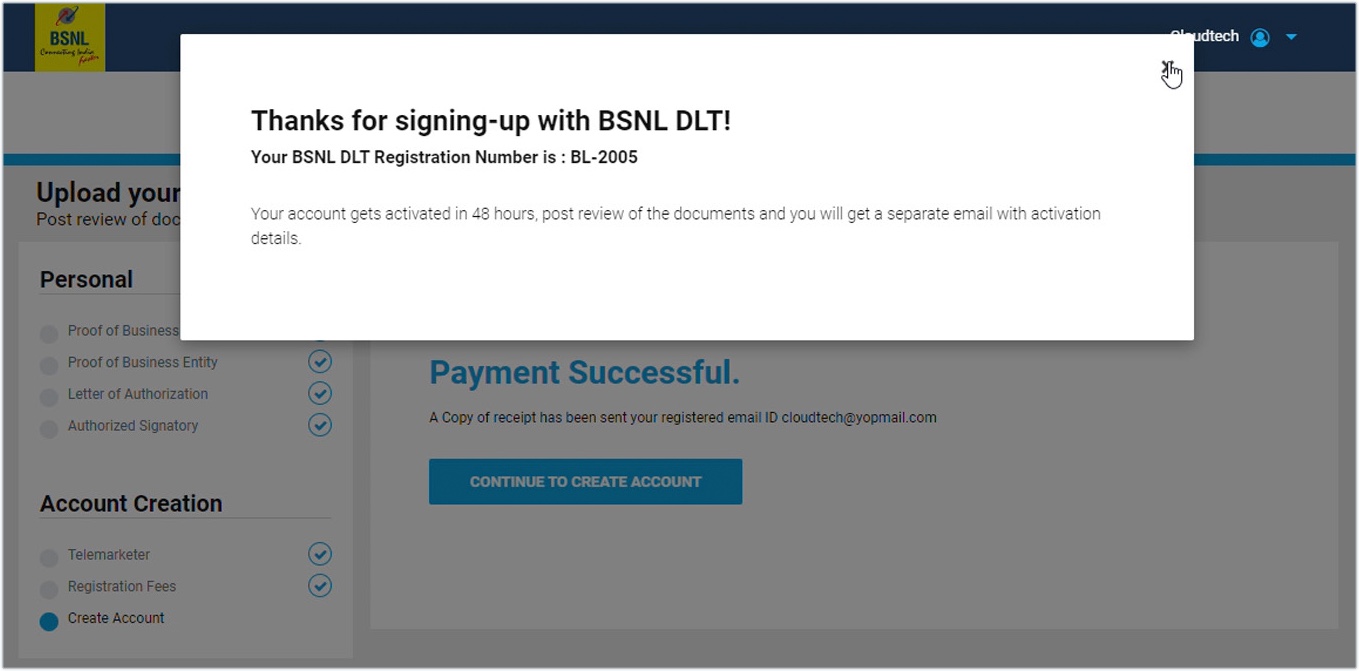
Payment of Registration Fee
-
Review Registration Summary
-
Select Payment Method:
- Net Banking
- Credit/Debit Card
- UPI Payment
- Wallet (PayTM/PhonePe if supported)
-
Complete Payment: ₹3540 (incl. GST)
-
Save Payment Receipt: Transaction ID will be sent via email
Payment Confirmation: You'll receive:
- Temporary registration number (e.g.,
TEMP/BSNL/2025/12345) - Acknowledgment email with application number
- Estimated approval timeline (48-72 hours)
Registration for the header
Here are the steps:
Go to the BSNL DLT registration page and click on the Login button.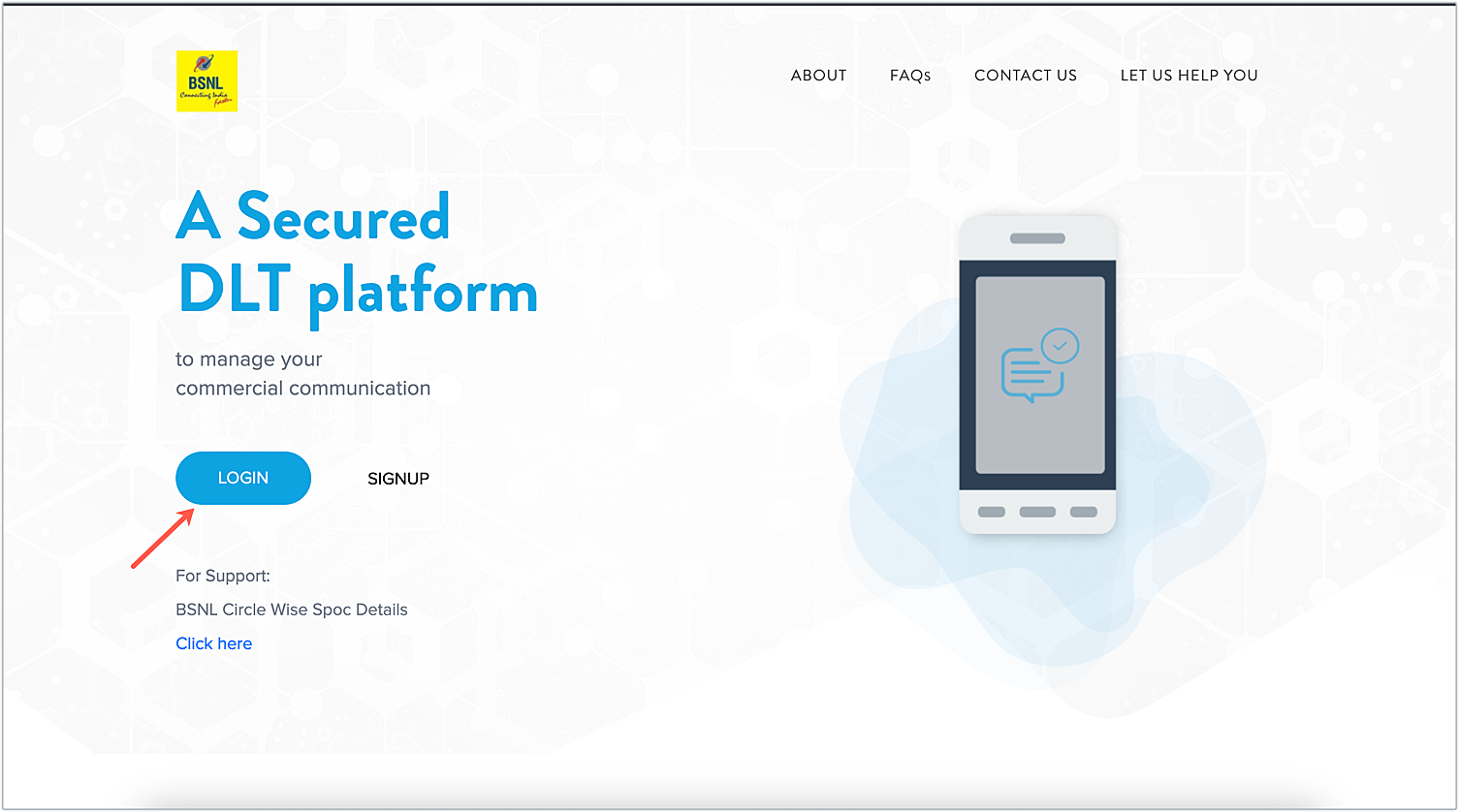
Pick a place to work As an Enterprise, log in with the credentials you get after registering the organization.
To log in, please check with OTP.
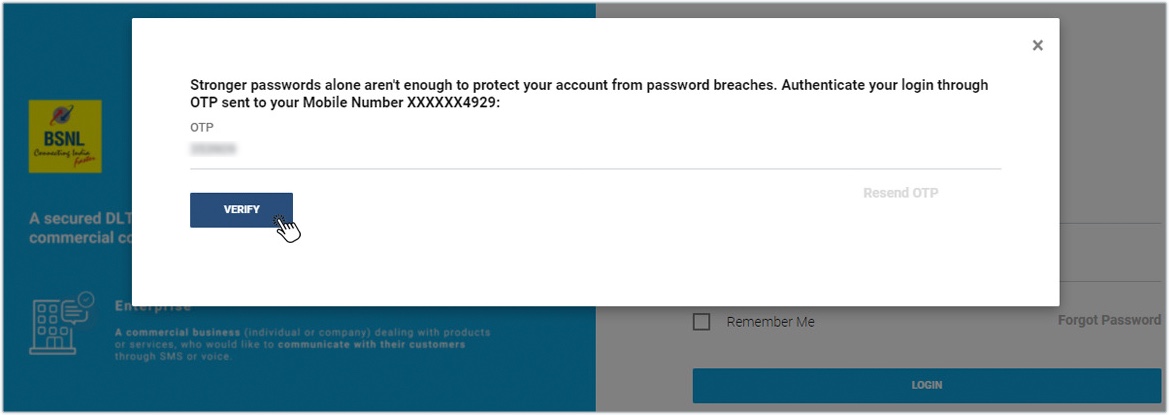
Account Activation & BSNL DLT Login
Timeline: 48-72 working hours (3 business days)
What Happens During Review:
- BSNL DLT team verifies all uploaded documents
- Cross-checks PAN details with Income Tax database
- Validates GST certificate authenticity
- Reviews authorization letter format
- Checks address proof validity
Upon Approval, You'll Receive:
Email notification containing:
- Entity ID (Your unique BSNL DLT identifier)
- Activation confirmation
- Login credentials reminder
- Next steps guide
SMS notification on registered mobile
How to Add Account in BSNL Portal (First Login):
- Visit: https://www.ucc-bsnl.co.in/login
- Select "Area of Operation": Enterprise
- Enter your credentials:
- Email/Mobile (used during registration)
- Password (created in Step 3)
- Verify with OTP sent to registered mobile
- Complete profile setup wizard
- Accept terms and conditions
Dashboard Overview After Login:
- Entity ID displayed prominently
- Account status: Active/Pending/Expired
- Header registration section
- Template management section
- Reports and analytics
- Account settings
Header (Sender ID) Registration on BSNL DLT
Headers (Sender IDs) are the 6-character identifiers that appear as the message sender on recipients' phones.
Header Types & Format Rules:
1. Promotional Headers (6-Digit Numeric)
Format: XXXXXX (all numbers)
First Digit Industry Code Mapping:
| First Digit | Industry Category | Example |
|---|---|---|
| 1 | Banking/Finance/Insurance | 123456 |
| 2 | Real Estate | 234567 |
| 3 | Education/Training | 345678 |
| 4 | Healthcare/Pharma | 456789 |
| 5 | Consumer Goods/Retail | 567890 |
| 6 | Hospitality/Tourism | 678901 |
| 7 | Media/Entertainment | 789012 |
| 8 | IT/Telecom | 890123 |
| 9 | Automobiles/Others | 901234 |
Example: If you're an e-commerce company (retail), your promotional header must start with 5, like: 567890, 534567, 589012
2. Transactional/Service Headers (6-Letter Alphabetic)
Format: XXXXXX (all capital letters)
Examples:
- BSNSMS (BSNL SMS)
- AMAZON (e-commerce)
- FLIPKT (Flipkart)
- SBBANK (State Bank)
- HDFC (HDFC Bank)
Rules:
- Must relate to your business name or brand
- No special characters or numbers
- Cannot impersonate government (POLICE, GOVT, etc.)
- Trademark-protected names need documentation
Click the Header tab, then click the Add icon in the upper right corner.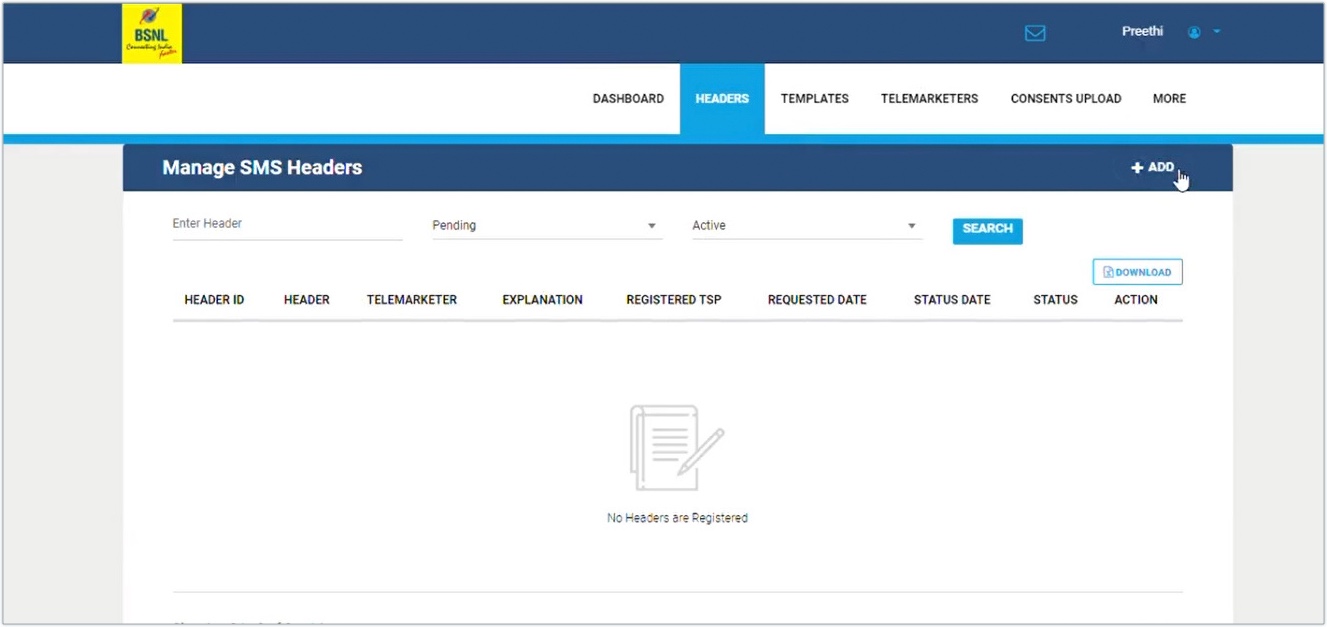
Please fill in the following information:
Select "Promotional" as the kind of header.
Select a company type from the list.
Type in a heading. The initial number in a promotional header will be different for each industry, but all headers must have six digits. You can pick a number to stand for your business.
Choose an attachment as proof that you've picked a header that fits your industry and your organization, and explain why.
To get permission, click Submit.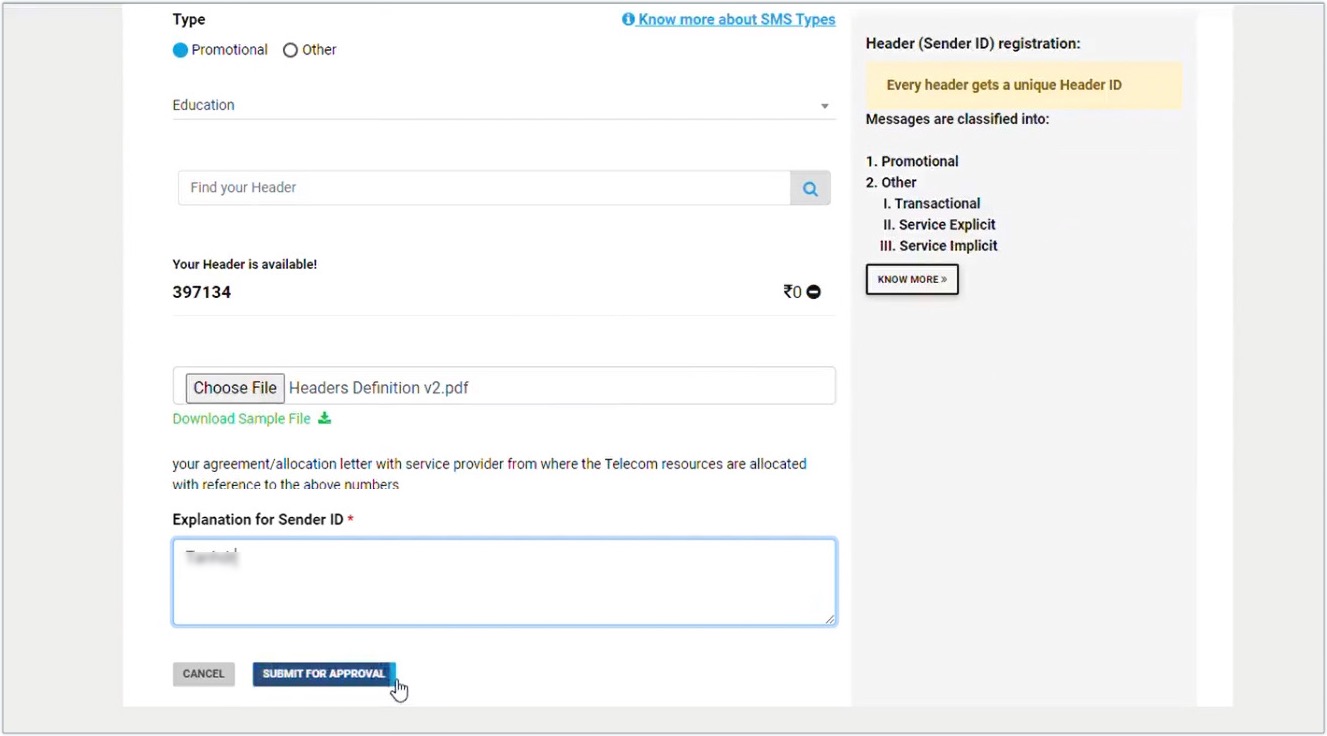
Once you send it in, the status of the header will say "Pending" till they check it out. After verification, the status will change to Approved. In the Header tab, you can see what the state of the header is.
How to Add Account in BSNL Portal (Additional Users)
If you need multiple team members to access your dlt portal bsnl account:
Adding Secondary Users:
- Login to your primary account
- Navigate to "Account Settings" → "User Management"
- Click "Add New User"
- Fill required details:
- User full name
- Email address (unique)
- Mobile number
- Role/Permissions:
- Admin (full access)
- Manager (header & template access)
- Viewer (read-only access)
- Click "Send Invitation"
- User receives email with setup link
- User completes profile and sets password
User Management Best Practices:
- Assign role-based access (don't give admin to everyone)
- Use corporate email IDs only
- Enable 2-factor authentication
- Regularly audit user activity logs
- Remove access for ex-employees immediately
Telemarketer Account Addition:
If you're a PE and need to add your SMS service provider as Telemarketer:
- Login to bsnl dlt portal
- Go to "Entities Account" → "Add Telemarketer"
- Enter Telemarketer details:
- Telemarketer Name (e.g., SMSGatewayHub)
- Telemarketer ID (provided by your SMS provider)
- Define role: Aggregator or Delivery
- Submit for approval
- Telemarketer accepts invitation
- Complete PE-TM chain binding (explained later)
Content Template Registration on BSNL DLT
Templates are pre-approved message formats. Every SMS you send must match a registered template exactly.
Template Categories:
1. Promotional Templates Used for: Marketing, offers, deals, advertisements Sent to: Non-DND numbers only Example:
Big Sale Alert! Get 50% OFF on all products. Shop now at www.yourstore.com. Valid till {#var#}. T&C apply. -YOURBRND
2. Transactional Templates (Banking OTP Only) Used for: Bank OTPs, financial transaction alerts Sent to: All numbers (including DND) Example:
Dear customer, your OTP for net banking login is {#var#}. Valid for 10 minutes. Do not share with anyone. -SBBANK
3. Service Implicit Templates Used for: Order updates, delivery status, appointment reminders, OTPs (non-banking) Sent to: All numbers (including DND) Example:
Dear {#var#}, your order #{#var#} has been shipped and will be delivered by {#var#}. Track: {#var#} -FLIPKT
4. Service Explicit Templates Used for: Opted-in service communications Sent to: Customers who explicitly consented Example:
Hi {#var#}, your monthly subscription of ₹{#var#} has been renewed. Next billing date: {#var#}. -NETFLIX
Common Errors & Solutions in BSNL DLT Registration
| Error/Issue | Probable Cause | Solution |
|---|---|---|
| PAN Already Registered | Entity exists on another TSP DLT | Select "Yes" during signup and retrieve credentials |
| Document Upload Failed | File size > 2MB or wrong format | Compress to <2MB, use PDF/JPG format |
| Header Rejected | Generic or misleading name | Choose brand-specific header, add trademark proof |
| Template Not Approved | Missing entity name or improper format | Add entity name at end, follow template guidelines |
| Payment Failed | Bank/network issues | Retry payment, check internet connection, use different payment mode |
| Account Not Activated After 72 Hours | Document verification pending | Contact BSNL support: support@ucc-bsnl.co.in |
| Login Credentials Not Received | Email in spam folder | Check spam/junk folder, add [email protected] to safe senders |
BSNL DLT Support Contact:
- Email: support@ucc-bsnl.co.in
- Portal: www.ucc-bsnl.co.in/support
- FAQ Section: www.ucc-bsnl.co.in/faq
- Response Time: 24-48 hours
Factors Affecting SMS Pricing:
- Monthly volume commitment (higher volume = lower per-SMS cost)
- Message type (transactional costs more than promotional)
- Delivery speed requirements (instant vs scheduled)
- Route quality (direct operator routes cost more but ensure delivery)
- DND scrubbing and management
SMSGatewayHub: Complete BSNL DLT + SMS Solution
If you're finding the dlt registration bsnl process overwhelming or need reliable bulk SMS services post-registration, SMSGatewayHub offers end-to-end solutions.
Why Choose SMSGatewayHub?
Complete DLT Registration Support
- ✅ End-to-end BSNL DLT registration assistance
- ✅ Document preparation and KYC verification
- ✅ Header naming strategy and approval management
- ✅ Template creation with compliance check
- ✅ PE-TM chain binding setup
- ✅ Multi-operator DLT registration (BSNL + Jio + Airtel + Vi)
Enterprise-Grade SMS Platform
- 99.9% delivery rate with direct BSNL operator connectivity
- Real-time delivery reports and analytics dashboard
- RESTful API with comprehensive documentation
- Bulk upload via CSV/Excel (up to 1 lakh numbers)
- Scheduled campaigns with timezone management
- Personalization engine with unlimited custom fields
- Unicode support for regional languages
- Link tracking and shortened URL management
- Two-way SMS for customer engagement
- Dedicated IP and SMSC route (for enterprise plans)
Professional Services
- Dedicated account manager
- 24/7 technical support (phone, email, chat)
- Free API integration assistance
- Campaign strategy consultation
- Compliance audit and health checks
- Regular training and documentation updates
Client Success Stories
E-Commerce Startup - 25K SMS/month
"We were completely lost with BSNL DLT registration. SMSGatewayHub team handled everything—from documents to template approvals. We went live in just 4 days! Their dashboard is incredibly easy to use, and delivery rates are fantastic." — Rohit Malhotra, Founder, ShopKaro.in
🏦 NBFC - 1.5L SMS/month
"Being in the finance sector, compliance is critical for us. SMSGatewayHub not only completed our dlt registration bsnl but also ensured all our OTP and transaction alert templates were perfectly compliant. Their dedicated manager is always available." — Anjali Desai, IT Head, QuickLoans Finance
🎓 Educational Institute - 40K SMS/month
"We needed to send admission alerts, exam notifications, and results via SMS. SMSGatewayHub helped us register on BSNL DLT portal and set up automated campaigns. The regional language support for Hindi and Marathi is a game-changer for us." — Prof. Suresh Patil, Admin Head, Maharashtra College of Engineering
How to Get Started with SMSGatewayHub
Contact Our Team
- 📧 Email: support@smsgatewayhub.com
- 📞 Phone: ++91-9907922122
- 🌐 Website: www.smsgatewayhub.com
- 💬 Live Chat: Available 10 AM - 8 PM IST
Special Offers (Limited Time)
🎁 New Customer Bonus:
- Get 5,000 FREE transactional SMS on signup (Business/Enterprise plans)
- BSNL DLT registration Help
🎁 Referral Program:
- Refer another business → Both get 10% discount for 3 months
Frequently Asked Questions (FAQs)
1. How long does BSNL DLT registration take?
Answer: Complete bsnl dlt registration typically takes 3-5 working days:
- Document verification: 24-48 hours
- Entity approval: 48-72 hours
- Header approval: 24-48 hours (transactional), 48-72 hours (promotional)
- Template approval: 1-4 hours (service implicit), 24-48 hours (promotional)
With SMSGatewayHub's express service, we can expedite to 48-72 hours total.
2. What are the exact BSNL DLT registration charges?
Answer: DLT registration charges for BSNL are approximately:
- Entity registration: ₹3540 (including GST)
- Validity: 1 year
- Annual renewal: Same fees (₹3540)
- Header registration: Free (included in entity fee)
- Template registration: Free (unlimited templates)
3. Can I register on BSNL DLT without GST number?
Answer:
- Proprietorships/Individuals: Can register without GST
- Companies/LLPs: GST registration is mandatory
- Exception: If your turnover is below ₹40 lakhs (as per GST Act), you may register as proprietorship without GST
4. How to add account in BSNL portal for multiple users?
Answer: To add additional users:
- Login to dlt portal bsnl with admin credentials
- Navigate to "User Management" or "Account Settings"
- Click "Add New User"
- Enter user details (name, email, mobile, role)
- Assign permissions (Admin/Manager/Viewer)
- User receives invitation email
- User completes profile setup
5. What is the difference between promotional and transactional headers?
Answer:
- Promotional headers: 6-digit numeric (e.g., 567890), used for marketing messages, sent only to non-DND numbers
- Transactional headers: 6-letter alphabetic (e.g., BSNSMS), used for OTP/alerts/service messages, sent to all numbers including DND
6. Can I use same template on multiple operators?
Answer: No, templates must be registered separately on each operator's DLT platform:
- Register template on BSNL DLT for BSNL route
- Register same template on Jio DLT for Jio route
- Register on Airtel DLT for Airtel route
However, template content and format can be identical across platforms.
7. What happens if my message doesn't match the registered template?
Answer:
- Message will be blocked by BSNL network
- You'll receive delivery failure report
- Repeated violations may lead to:
- Entity suspension
- Blacklisting of headers
- Regulatory penalties from TRAI
Always ensure 100% template match, including punctuation and spacing.
8. How many headers can I register on BSNL DLT?
Answer: Unlimited headers can be registered. However:
- Register based on actual business need
- Typical businesses use: 1 transactional + 1-2 promotional headers
- Each header must serve a distinct purpose
- Separate headers for different business verticals (if applicable)
9. Is PE-TM chain binding mandatory for all businesses?
Answer: Yes, as per TRAI directive effective December 1, 2024:
- All PEs must disclose their complete telemarketer chain
- Without registered PE-TM chain, messages will be blocked
- Chain includes all intermediaries from PE to final delivery TM
10. Can I migrate from another operator's DLT to BSNL?
Answer: Yes, migration is simple:
- Complete bsnl dlt registration (select "Already registered on another operator")
- Keep existing DLT active (don't deactivate)
- Run parallel for 1-2 weeks to test delivery
- Route-wise distribution: use BSNL DLT for BSNL route, Jio DLT for Jio route
- Most businesses maintain multi-operator DLT for better reach
11. What if BSNL DLT portal is down or not accessible?
Answer:
- Check official maintenance schedule: www.ucc-bsnl.co.in/maintenance
- Typical maintenance: Sunday 12 AM - 6 AM IST
- For extended downtime, contact support: support@ucc-bsnl.co.in
- If urgent, use other operator DLT (if registered) for message delivery
12. How to check if my BSNL DLT registration is active?
Answer:
- Login to bsnl dlt portal: www.ucc-bsnl.co.in
- Dashboard shows:
- Entity ID
- Registration status: Active/Expired/Suspended
- Validity date
- Renewal due date
- Set calendar reminder 30 days before expiry for renewal
Conclusion
The BSNL DLT registration process, while detailed, is essential for legal and uninterrupted SMS communication in India. With systematic document preparation, accurate portal entries, and strategic header-template planning, your business can complete dlt registration bsnl smoothly within 3-5 working days.
BSNL's government-backed infrastructure, competitive pricing (₹3,540 vs ₹5,900+ for private operators), and stable network make it an attractive choice for businesses of all sizes. The bsnl dlt portal offers a user-friendly interface for how to add account in bsnl portal, manage headers, create templates, and establish PE-TM chains efficiently.
Whether you choose the DIY route or prefer expert assistance from SMSGatewayHub, ensuring DLT compliance is non-negotiable. Non-compliant messages face immediate blocking, potential regulatory penalties, and damage to brand reputation.
Ready to start?
- DIY Registration: Visit www.ucc-bsnl.co.in and begin your registration
- Expert Assistance: Contact SMSGatewayHub at support@smsgatewayhub.com for hassle-free, fully-managed BSNL DLT registration and reliable bulk SMS services
With proper DLT registration and a trusted SMS gateway partner, your business can leverage SMS marketing's 98% open rate and instant delivery to drive engagement, conversions, and customer loyalty—all while staying 100% compliant with TRAI regulations.
Need personalized assistance? Our team at SMSGatewayHub is ready to help you navigate BSNL DLT registration and launch successful SMS campaigns. Get in touch today!
📧 support@smsgatewayhub.com | 📞 +91-9907922122 | 🌐 www.smsgatewayhub.com
Disclaimer: DLT registration charges, processes, and timelines mentioned in this article are based on available information . Fees and procedures may be updated by BSNL without prior notice. Always verify current details on the official BSNL DLT portal (www.ucc-bsnl.co.in) before proceeding with registration.