If you're planning to send bulk SMS in India, there's one legal requirement you cannot skip: DLT Registration.
Many businesses lose money because they don't know about DLT. Some even face penalties!
DLT (Distributed Ledger Technology) registration is mandatory in India since 2018. Without it, your SMS delivery rate drops to 10-20%, and you risk government action.
In this guide, I'll show you exactly how to register for DLT, what documents you need, and common mistakes to avoid. Whether you're using Jio, Airtel, BSNL, or Vodafone - this guide covers everything.
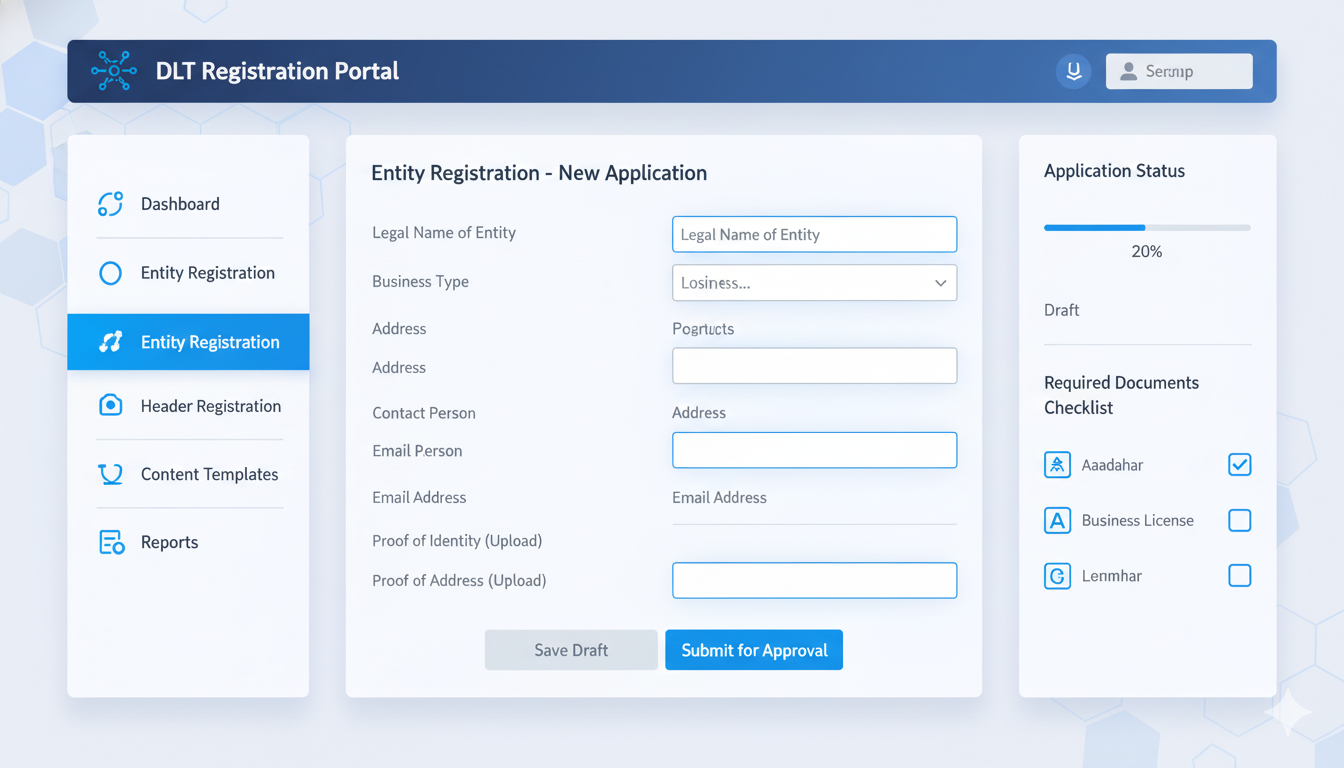
What is DLT? (Simple Explanation)
What Does DLT Stand For?
DLT = Distributed Ledger Technology
But don't let the technical name scare you. In simple words:
DLT is an online database where you register:
- Your business details
- What SMS you want to send
- Who can receive your SMS
The Government of India made this system to stop spam messages and fraud. Before DLT, scammers sent fake bank messages and tricks. So the government created DLT to control it.
How Does DLT Work?
Think of it like this: You → Register on DLT → Choose SMS Type → Add Your Messages → Get Approval → Send SMS
Every SMS you send goes through DLT verification. If your SMS matches your approved template, it gets delivered. If it doesn't match, it gets blocked.
Who Needs DLT Registration?
You MUST register DLT if you:
- Send promotional SMS (offers, discounts, announcements)
- Send bulk SMS (more than 100 messages at once)
- Run a business (not personal messages)
- Use an SMS service provider
You do NOT need DLT for:
- Personal WhatsApp messages
- Personal SMS to friends
- OTP (One Time Password) for your app
- Bank SMS alerts
- Transactional SMS (order confirmations)
Recommended Reads -
Best Bulk SMS Provider by City
- Best Bulk SMS Service in Chennai
- Get the Best Bulk SMS Provider in Mumbai
- Affordable Bulk SMS Services in Delhi
Best Bulk SMS Provider by Industry
- Best Bulk SMS Service Providers in India for Educational Institutes
- Best SMS Marketing Solutions for Healthcare Providers in India
- Bulk SMS Services for Transport Industry
- Bulk SMS Service for Logistics
- Improve Life Insurance Retention
- Real Estate Lead Generation with Bulk SMS India
Why DLT Registration is Important (Benefits)
1. Legal Compliance
- TRAI (Telecom Regulatory Authority of India) made it law
- Not registering = violation of law
- Penalty = ₹25,000+ and legal action
2. Better SMS Delivery
- Without DLT: Only 10-20% SMS get delivered
- With DLT: 95%+ SMS get delivered
- Reason: Your SMS are trusted by the network
3. Business Trust
- Customers trust SMS from registered businesses
- Your SMS look professional
- Better brand reputation
4. Avoid Blocking
- Telecom operators block unregistered SMS
- Your messages go straight to spam
- DLT registration prevents this
5. Access to All Platforms
6. Track Your SMS
- See delivery reports
- Know which SMS succeeded/failed
- Improve over time
Related Resources - Where to Buy OTP SMS Solutions in India
What is a DLT Template?
Before we go to registration, you need to understand DLT Templates.
What is a Template?
A DLT template is the exact SMS message you want to send. Example:
TEMPLATE: "Hi {name}, You have a payment due of {amount}.
Click {link} to pay. Reply STOP to unsubscribe."
Why Templates?
DLT checks that every SMS you send matches your approved template. If you send something different, it gets blocked.
Template Categories
There are 2 categories:
1. Promotional (Marketing messages)
- "Buy now with 50% off"
- "New product launched"
- "Join our membership program"
2. Transactional (Business messages)
- "Your OTP is 123456"
- "Order confirmed: #12345"
- "Your refund has been processed"
⚠️ Important: Promotional SMS can only be sent between 9 AM to 9 PM.
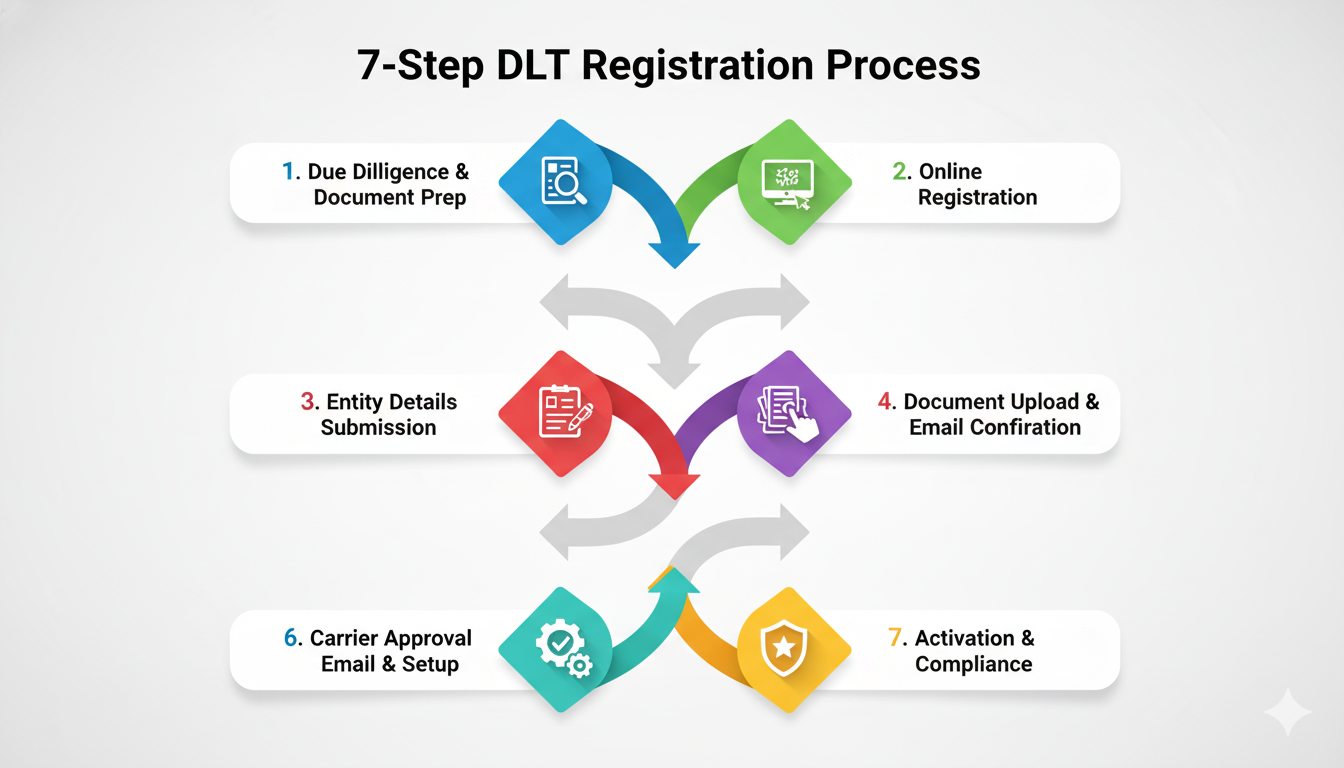
Step-by-Step DLT Registration Process
Step 1: Prepare Your Documents (Before You Start)
You need these documents ready:
1. PAN Card (Permanent Account Number)
- Front and back copy
- Must be clear and readable
2. GST Certificate (if registered)
- Certificate copy
- Business registration number
3. Business Registration
- Company registration certificate OR
- Proprietorship deed OR
- Partnership agreement
4. Authorized Signatory Letter
- Letter from company director
- On company letterhead
- Signed and dated
- [Download format here](link to your template)
5. Director/Owner ID Proof
- Aadhar card copy OR
- Passport copy OR
- Voter ID copy
- Clear photo
6. Business Address Proof
- Electricity bill OR
- Rent agreement OR
- Lease deed
- Not older than 3 months
Time to gather: 2-3 days
Step 2: Visit the DLT Portal
DLT has different portals for different operators:
| Operator | Website |
|---|---|
| Jio | https://trueconnect.jio.com |
| Airtel | https://dltconnect.airtel.in/ |
| BSNL |
https://www.ucc-bsnl.co.in/ |
| Vodafone | https://www.vilpower.in/ |
For this guide, I'll use Jio TrueConnect (most popular).
Steps:
- Open trueconnect.jio.com
- Click "New User Registration"
- Enter your email and create password
- Verify email by clicking link
- You're logged in!
Step 3: Fill Entity Details (Your Company Information)
This is Step 1 of registration:
What you'll enter:
- Company legal name
- Business type (Sole Proprietor / Partnership / Company)
- GST number (if you have one)
- Business address
- Phone number
- Email address
You'll get: Entity ID (PE ID)
- This is your unique business ID
- You'll need this for everything
- Example: PE ID = 1001234567890
Time: 5-10 minutes
Step 4: Fill Telemarketer Details
This is Step 2 of registration:
What you'll enter:
- Who will send SMS from your business?
- Name of SMS manager
- Their phone number
- Their email
- Which SMS categories they can send (Promotional/Transactional)
Example:
- Entity: ABC Company
- Telemarketer: Rajesh Kumar (Marketing Head)
- Authority: Can send Promotional SMS
Time: 5 minutes
Step 5: Upload Documents
What to do:
- Click "Upload Documents"
- Select file type (PAN, GST, etc.)
- Browse and select file
- Click Upload
- Repeat for all documents
Important:
- File size: Max 5 MB
- File format: PDF, JPG, PNG
- Files must be clear and readable
- Names must match exactly with DLT records
Time: 10-15 minutes
Step 6: Create SMS Templates
This is most important step!
What you do:
- Click "Add Template"
- Choose category (Promotional or Transactional)
- Write your SMS message
- Add variables like {name}, {amount}, {date}
- Click Submit
Template Rules:
- Max 160 characters (1 SMS)
- Must be in English (unless special approval)
- Cannot have spam words (like "Free Money", "Loan")
- Cannot mislead customers
- Must have "STOP to unsubscribe" if promotional
Example Good Template:
"Hi {name}, You have registered for our service.
Your Account ID is {account_id}. Visit {website} to login.
Call us at {phone} for support."
Example Bad Template (Will be REJECTED):
"FREE MONEY!!! Earn ₹1000 daily!
Click here and get RICH!!!
Limited offer!"
Time: 10-15 minutes per template
Step 7: Wait for Approval
What happens:
- You submit your application
- DLT team reviews your documents
- DLT team reviews your templates
- You get approval email
Approval Timeline:
- Standard: 5-7 business days
- With corrections: 10-15 days
- Urgent: 24 hours (costs extra)
Status Check:
- Login to your account
- Check "Application Status"
- See approval status in real-time
Common Rejection Reasons:
- Bad document quality - Take new photo
- Template has spam words - Rewrite template
- Wrong signatory letter - Get new letter from director
- Missing documents - Upload missing files
If Rejected:
- You'll get email explaining why
- Fix the issue
- Resubmit
- Wait again for approval
Step 8: You're Approved!
What you get:
- Approval email with PE ID (Entity ID)
- Approval letter (save for records)
- Approved template list (your SMS)
- Access to send SMS
Next Steps:
- Login to SMS service provider
- Enter your PE ID
- Start sending SMS!
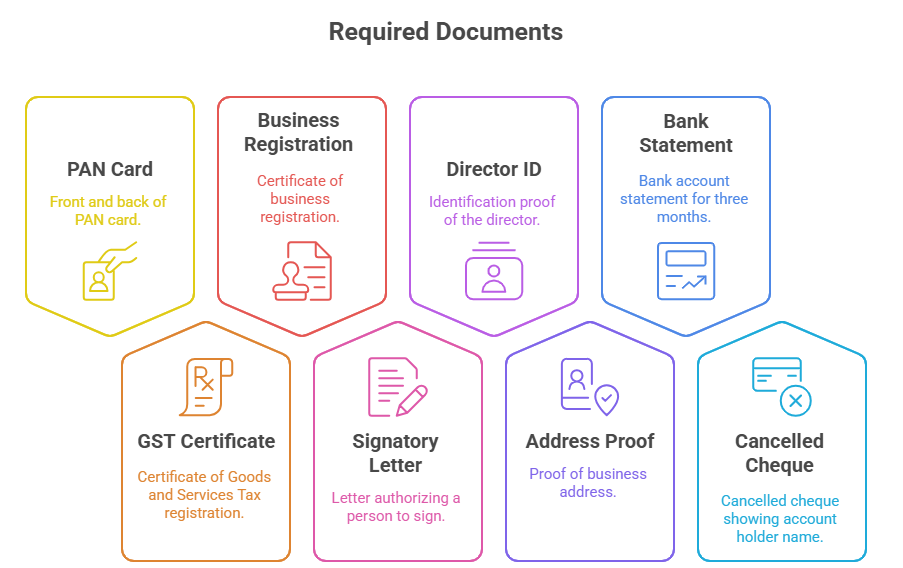
Documents You Need (Checklist)
Here's a printable checklist:☐ PAN Card (front + back)
☐ GST Certificate
☐ Business Registration Certificate
☐ Authorized Signatory Letter (on letterhead, signed)
☐ Director ID Proof (Aadhar/Passport/Voter ID)
☐ Business Address Proof (utility bill, rent agreement)
☐ Bank Account Statement (any 3 months)
☐ Cancelled Cheque (showing account holder name)
Pro Tip: Make PDF files of everything. DLT prefers PDF format.
.png)
Timeline - How Long Does It Take?
Here's a complete timeline from start to SMS sending:Day 1: Gather documents (2-3 hours)
Day 2-3: Complete registration (30 minutes)
Day 4-11: Wait for DLT approval (7 days)
Day 12: Receive approval email
Day 13: Login to SMS provider and start sending
Day 14: First SMS sent successfully
✅
TOTAL TIME: 2 weeks
What to do while waiting:
- Create more SMS templates
- Prepare your contact list
- Plan your SMS campaign
- Train your team
Common DLT Registration Mistakes (AVOID THESE!)
Mistake #1: Sending SMS Without DLT
What happens:
- SMS delivery rate drops to 10-20%
- Customers don't receive messages
- Government penalty ₹25,000+
How to avoid:
- Always check if DLT is approved first
- Keep approval email
- Don't rush to send
Mistake #2: Wrong Template Category
What happens:
- Promotional SMS can only send 9 AM - 9 PM
- SMS sent at 8 PM gets blocked
- Customer doesn't receive offer
How to avoid:
- Understand promotional vs transactional
- Schedule SMS during allowed hours
- Test with small batch first
Mistake #3: Changing SMS Content
What happens:
- You approved template: "Hi {name}, Order {order_id} confirmed"
- You send: "Hi {name}, SUPER SALE! Order now!"
- SMS gets blocked (doesn't match template)
How to avoid:
- Always match your SMS with approved template
- If you want different SMS, create new template
- Get approval before sending new content
Mistake #4: Bad Document Quality
What happens:
- You upload blurry PAN card photo
- DLT cannot read it
- Application rejected
How to avoid:
- Take clear photos (good lighting)
- Use scanner if possible
- Get someone else to verify it's clear
Mistake #5: Spam Words in Template
Forbidden words in promotional SMS:
- "FREE" (if implying money)
- "CLICK HERE NOW"
- "LIMITED OFFER" (in caps)
- "100% GUARANTEED"
- "RISK FREE"
- "NO COST"
How to avoid:
- Write professional templates
- Avoid marketing hype language
- Follow DLT template guidelines
Mistake #6: Wrong PE ID (Entity ID)
What happens:
- You give wrong PE ID to SMS provider
- SMS goes to wrong database
- SMS don't send at all
How to avoid:
- Copy-paste PE ID from approval email
- Never type manually
- Double-check with provider
Mistake #7: Expired Documents
What happens:
- Your GST certificate expired
- DLT rejects application
How to avoid:
- Check all documents are current
- Renew before they expire
- Keep updated copies
You May Also Like - Best Bulk SMS Provider for Startups in India
DLT Registration by Different Operators
Option A: Jio DLT (Most Popular)
Time: 7 days approval Process: User-friendly, easy steps Best for: All businesses
Option B: Airtel DLT
Time: 5-7 days approval Process: Similar to Jio Best for: Airtel network users
Option C: BSNL DLT
Time: 10-15 days approval Process: Government portal, slower Best for: Government communication
Option D: Vodafone VilPower
Time: 5 days approval Process: Quick process Best for: Vodafone network
How to Check DLT Registration Status
Method 1: Online Portal
- Go to DLT website (e.g., trueconnect.jio.com)
- Login with your email and password
- Click "Track Application"
- You'll see status:
- "Under Review"
- "Approved" ✅
- "Rejected" ❌
- "Corrected" (changes needed)
Method 2: Email
DLT sends status updates to your email:
- Approval email (7 days)
- If rejected: Reason email
- If approved: Certificate email
Method 3: SMS from Provider
Your SMS provider dashboard also shows:
- "DLT Approved"
- "Ready to send"
What If Your DLT Registration Gets Rejected?
Don't worry! Rejection is common and fixable.
Common Rejection Reasons
| Reason | Solution |
|---|---|
| Bad document photo | Take new clear photo, resubmit |
| Missing document | Find document, upload, resubmit |
| Wrong signatory letter | Get new letter from director with signature |
| Spam words in template | Remove bad words, write clean template |
| Wrong business category | Select correct category (proprietor/company) |
| Incomplete address | Add full address with pincode |
How to Resubmit
- Login to DLT portal
- Click "View Application"
- Click "Edit"
- Fix the issue
- Re-upload documents
- Re-submit
- Wait 5-7 days again
Total time: +7-10 days (not 2 weeks again)
After Approval - What's Next?
Step 1: Get Approval Letter
- Check email
- Download approval letter
- Keep safe (you'll need it)
Step 2: Activate SMS Service
- Login to your SMS provider (like SMSgatewayHub)
- Enter your PE ID (Entity ID)
- System verifies with DLT
- "Verified ✅" shown on dashboard
Step 3: Send Your First SMS
- Upload your contact list
- Select approved template
- Choose send time
- Click Send
- SMS are sent! 📱
Step 4: Track Delivery
- Login to SMS provider
- See delivery report
- Check which SMS succeeded/failed
- View statistics
DLT Renewal - Do You Need to Renew?
Valid Duration: DLT registration is valid for 1 year
After 1 year:
- You need to renew
- Process is same as registration
- Takes 7 days again
- Renewal is also FREE
When to renew:
- 30 days before expiry
- Portal will show notification
- You'll get email reminder
FREQUENTLY ASKED QUESTIONS (FAQ)
Q1: Can I send SMS without DLT registration?
Answer: Technically you can, but:
- Delivery rate: Only 10-20% (most SMS blocked)
- You'll face TRAI penalties
- Not recommended at all
We strongly advise registering first.
Q2: How long does DLT approval take?
Answer:
- Standard: 7 business days
- If documents need corrections: 10-15 days
- Urgent approval: 24 hours (costs ₹6500+)
Start the process now so you don't wait later.
Q3: Do I need separate registration for each operator (Jio, Airtel, BSNL)?
Answer: NO! One registration covers all operators:
- Register once on any DLT portal (we recommend Jio)
- Your SMS work on Jio, Airtel, BSNL, Vodafone
- All networks respect the same registration
Q4: Can I change my SMS template after approval?
Answer: YES, but:
To change: Create new template → Get new approval → Use new template
Cannot change: Existing approved template (must follow it exactly)
Always create new template if content changes.
Q5: What's the difference between promotional and transactional SMS?
Answer: Promotional SMS:
- Marketing messages (offers, discounts, announcements)
- Can send: 9 AM to 9 PM only
- Example: "50% off sale - Buy now!"
Transactional SMS:
- Business messages (OTP, order confirmation, alerts)
- Can send: 24/7 (anytime)
- Example: "Your OTP is 123456"
Q6: Can I use someone else's DLT registration?
Answer: NO.
- Each business needs own registration
- Using someone else's is illegal
- TRAI can fine you
- Always register in your business name
Q7: What if my SMS gets blocked after DLT approval?
Answer: Common reasons:
- Wrong template - Your SMS doesn't match approved template
- Outside time - Promotional SMS sent after 9 PM
- Spam words - Content has forbidden words
- DND number - You sent to DND protected number
- Recipient blocked - Customer blocked sender ID
Solution: Check delivery report → Fix issue → Resend
Q8: Can I register DLT for my small business?
Answer: YES!
DLT is for:
- Solo businesses ✅
- Small shops ✅
- Startups ✅
- Big companies ✅
- NGOs ✅
Anyone who sends SMS needs DLT.
Q9: Is DLT registration free?
Answer: YES! 100% FREE.
- No registration fee
- No approval fee
- No yearly maintenance fee
- Completely FREE
Only pay for SMS you send to customers.
Q10: What happens if I send SMS with wrong PE ID?
Answer: SMS won't be sent.
The network checks PE ID:
- If correct: SMS sent ✅
- If wrong: SMS rejected ❌
- Error message in delivery report
Always verify PE ID before starting.
Q11: Can I have multiple SMS templates?
Answer: YES!
You can create:
- 5 templates
- 10 templates
- 50 templates
- 100+ templates
Each needs approval, but all can be approved.
Q12: What if I want to send SMS from different name?
Answer: You need different DLT registration.
Example:
- Company: ABC Ltd
- Brand 1: ABC Beauty → Register separately
- Brand 2: ABC Electronics → Register separately
Each brand needs its own PE ID and templates.
Q13: Is DLT registration valid nationwide?
Answer: YES!
Once you register (any operator), you can send SMS to:
- All states in India ✅
- All mobile networks ✅
- All numbers ✅
Valid across entire India.
Q14: How do I know if a number is DND?
Answer: DND = Do Not Call registry
- Customer opted-in to DND
- Cannot send promotional SMS to DND numbers
- Can only send transactional SMS (OTP, orders, etc.)
- Filter DND before sending
Use DND checker tools before campaigns.
.png)
FINAL CHECKLIST: Ready to Register?
Before you start, tick these:
☐ Gathered all documents
☐ Know your PE ID will be for
☐ Decided on SMS templates
☐ Read common mistakes section
☐ Know DLT timeline (7 days)
☐ Have SMS provider account ready
☐ Informed your team
Need help with DLT registration? 📞 Call: +91-9907922122 📧 Email: support@smsgatewayhub.com