
Airtel DLT Login, Portal Access & Dashboard Explained (2026)
Airtel DLT login is an essential step for businesses and SMS service providers to manage compliant commercial messaging in India. Whether you want to register sender IDs, approve SMS templates, or manage PE-TM chain binding, everything starts with logging into the Airtel Commercial Communication (DLT) portal.
In this guide, we’ll explain how to log in to Airtel DLT, how the portal works, dashboard features, and solutions for common login problems—updated for 2026.
👉 Get DLT Support | 👉 Talk to Bulk SMS Expert | 👉 Start Sending SMS Now
Contact SMSGatewayHub:
📞 Call: +91-9907922122
📧 Email: support@smsgatewayhub.com
🌐 Visit: www.smsgatewayhub.com
What is Airtel DLT Login?
Airtel DLT login allows Principal Entities (businesses) and Telemarketers (bulk SMS providers) to access Airtel’s official DLT Connect platform, built as per TRAI TCCCPR 2018 regulations.
Through the Airtel DLT portal, users can:
-
Access their registered business profile
-
Create and manage Sender IDs (Headers)
-
Submit and approve SMS templates
-
Perform PE-TM chain binding
-
Track approval and compliance status
Without successful DLT Airtel login, commercial SMS delivery on Airtel’s network is not possible.
Official Airtel DLT Portal URL
The only official portal for Airtel DLT login is:
Commercial Communication Platform – Airtel Business
Official url -https://www.airtel.in/business/commercial-communication/home
👉 (Search on Google: Airtel DLT Commercial Communication Platform)
Avoid third-party or fake login pages claiming to be “Airtel DLT”.
Who Can Use Airtel DLT Login?
1️⃣ Business Owners (Principal Entity)
-
E-commerce companies
-
Banks & financial institutions
-
Schools, hospitals, startups
-
Any organization sending SMS to customers
2️⃣ Bulk SMS Providers (Telemarketers)
-
TM Aggregators
-
TM Delivery (Direct Airtel connectivity)
Both categories use the same DLT portal Airtel, but dashboard options differ.
Step-by-Step Airtel DLT Login Process (2026)
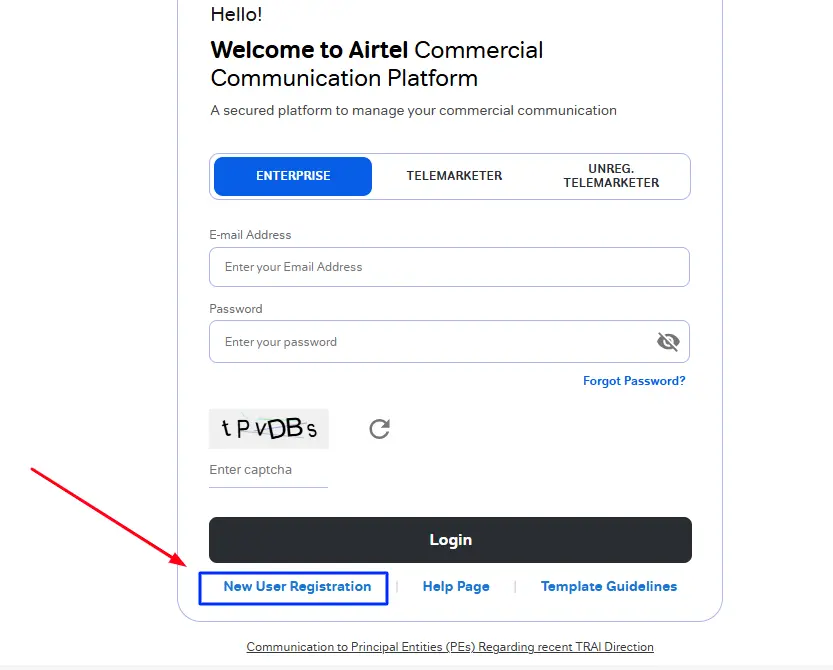
Step 1: Open Airtel DLT Portal
-
Open Chrome / Firefox / Edge
-
Visit Airtel Business Commercial Communication page
-
Click Login
Step 2: Enter Login Credentials
For Airtel DLT business login, use:
-
Username: Registered email ID
-
Password: Password created during registration
👉 This applies to:
-
airtel dlt login
-
dlt airtel login
-
dltconnect airtel login
Step 3: OTP / Security Verification (If Prompted)
Sometimes Airtel adds an extra security layer:
-
OTP sent to registered mobile/email
-
Enter OTP to continue
Step 4: Access Airtel DLT Dashboard
After successful login, you’ll reach the DLT portal dashboard, where you can manage all compliance activities.
Airtel DLT Dashboard Explained
Once logged in, the dashboard typically includes:
🔹 Profile & Entity Details
-
Business name
-
Entity ID
-
Registration status
-
Renewal validity
🔹 Header (Sender ID) Management
-
Create new headers
-
Track approval status
-
View active sender IDs
👉 Read More : Airtel DLT Registration
🔹 Template Management
-
Submit SMS templates
-
View approved / rejected templates
-
Edit and resubmit rejected templates
🔹 PE–TM Chain Binding
-
Link business (PE) with SMS provider (TM)
-
Mandatory for message delivery
-
View active and inactive chains
🔹 Transaction & Payment Section
-
Registration fee status
-
Renewal payments
-
Transaction reference numbers
Common Airtel DLT Login Issues & Solutions
❌ Forgot Password
Solution:
-
Click “Forgot Password”
-
Enter registered email
-
Reset using OTP link
❌ Invalid Username or Password
Causes:
-
Wrong email ID
-
Extra spaces while copying
-
Old password after reset
Fix:
-
Re-enter credentials manually
-
Reset password if needed
❌ Account Not Activated
Cause:
-
Registration under verification
-
Documents pending approval
Fix:
-
Wait 24–72 working hours
-
Contact DLT support or your SMS provider
❌ Portal Not Loading / Error
Fixes:
-
Clear browser cache
-
Use Chrome or Edge
-
Disable ad-blockers
-
Try non-peak hours
Airtel DLT Business Login vs Telemarketer Login
| Feature | Business (PE) | Telemarketer (TM) |
|---|---|---|
| Header Creation | ✅ | ❌ |
| Template Creation | ✅ | ❌ |
| Chain Binding | View Only | Full Control |
| Client Management | ❌ | ✅ |
| SMS Routing | ❌ | ✅ |
👉 Choose the correct role during registration to avoid dashboard limitations.
Security Tips for Airtel DLT Login
-
Use a strong password
-
Do not share login with unauthorized users
-
Change password every 3–6 months
-
Use official Airtel portal only
-
Maintain updated contact details for OTP
Frequently Asked Questions (FAQs)
Q1. Can I log in to Airtel DLT without registration?
No. Login access is available only after successful DLT registration approval.
Q2. Is Airtel DLT login free?
Login is free, but entity registration costs ₹5,000 + GST annually.
Q3. Can one email be used for multiple DLT accounts?
No. Each Airtel DLT account requires a unique email ID.
Q4. What if Airtel DLT portal is down?
Temporary maintenance may occur. Try again after some time or use another browser.

Conclusion
Airtel DLT login is the gateway to compliant, reliable SMS communication on Airtel’s network. Whether you are a business owner or a bulk SMS provider, understanding the DLT portal Airtel, dashboard features, and login troubleshooting ensures smooth operations and uninterrupted message delivery.
If you need expert help with Airtel DLT login, registration, template approval, or PE-TM chain binding, working with an experienced SMS partner can save time and avoid costly mistakes.
👉 SMSGatewayHub provides complete Airtel DLT assistance—from registration to high-volume SMS delivery.
📧 support@smsgatewayhub.com
📞 +91-9907922122
🌐 www.smsgatewayhub.com