Airtel DLT Registration 2026: Complete Step-by-Step Guide with Login & Charges

Quick Registration Overview:
- Approval Time: 24-48 hours (1-2 working days)
- Registration Cost: ₹5,000 + GST (Annual)
- Required Documents: PAN Card, GST/Business Certificate, ID Proof, Authorization Letter
- Official Portal: https://www.airtel.in/business/commercial-communication/registration
- Telemarketer id: 1302157243747322354
- Annual Renewal: Required
Click now -Free Airtel DLT Registration Support – Get Help Now
What is Airtel DLT Registration?
Airtel DLT registration is the mandatory process of registering your business entity on Airtel's DLT Connect platform—a blockchain-based Distributed Ledger Technology system operated by Bharti Airtel Limited, India's second-largest telecom operator. This DLT platform ensures full compliance with TRAI's TCCCPR 2018 regulations, enabling businesses to send legitimate commercial SMS while protecting consumers from spam.
The Airtel portal login gives businesses access to a comprehensive dashboard where they can register headers (sender IDs), create message templates, manage PE-TM chains, and monitor campaign performance—all while maintaining complete regulatory transparency.
Why is DLT Registration Mandatory?
With over 1.5-1.7 billion commercial messages sent daily across India, the Telecom Regulatory Authority of India (TRAI) introduced the DLT registration process to combat spam and protect consumer interests. Here's why airtel dlt registration is critical:
✅ Legal Compliance: Mandatory as per TCCCPR 2018 regulations
✅ Message Delivery: Without DLT registration, 100% of your SMS will be blocked
✅ Brand Protection: Prevents unauthorized use of your sender ID by fraudsters
✅ Customer Trust: Verified communications build credibility
✅ Regulatory Transparency: Complete audit trail from sender to recipient
✅ Avoid Penalties: Non-compliance leads to blacklisting and hefty fines
Important Update (December 2025): All Principal Entities must now complete PE-TM chain binding to ensure message delivery. Messages without registered chains will be blocked starting December 1, 2025.
DLT Registration Charges: Complete Fee Breakdown 2026
Understanding dlt registration charges helps businesses budget accurately for compliance:
Airtel DLT Registration Fees
| Registration Type | Airtel Charges (2026) | Validity |
|---|---|---|
| Entity Registration | ₹5,000 + GST | 1 Year |
| Annual Renewal | ₹5,000 + GST | 1 Year |
| Header Registration | Free (Unlimited) | Perpetual |
| Template Registration | Free (Unlimited) | Perpetual |
| PE-TM Chain Binding | Free | Active |
| URL Whitelisting | Free | Perpetual |
Total First Year Cost: ₹5,000 +(GST18%) = ₹5,900
Airtel's Advantage: Despite charging upfront , Airtel DLT offers:
- Fastest template approval (as quick as 30-60 minutes for transactional)
- Most user-friendly dlt portal interface
- Best customer support with dedicated helpdesk
- Highest delivery rates through direct SMSC routes
- Most stable platform with 99.8% uptime
Who Needs Airtel DLT Registration?
Principal Entity (PE) - Business Categories
You must complete dlt registration airtel if you're:
E-Commerce & Retail:
- Online marketplaces (order confirmations, delivery updates)
- Retail stores (promotional offers, stock alerts)
- Food delivery apps (order tracking, offers)
Banking & Financial Services:
- Banks (OTP, transaction alerts, balance updates)
- NBFCs (loan alerts, payment reminders)
- Insurance companies (policy updates, premium reminders)
- Fintech apps (wallet transactions, investment updates)
Education & Training:
- Schools and colleges (admission alerts, exam notifications)
- Coaching institutes (class schedules, results)
- EdTech platforms (course updates, live class reminders)
Healthcare:
- Hospitals (appointment reminders, lab reports)
- Clinics (consultation alerts, follow-up messages)
- Pharmacies (medicine availability, refill reminders)
Technology & Startups:
- SaaS companies (account alerts, feature updates)
- App developers (OTP verification, notifications)
- Gaming platforms (tournament alerts, reward notifications)
Real Estate & Travel:
- Property developers (site visit bookings, offers)
- Travel agencies (booking confirmations, itinerary updates)
- Hotels (reservation confirmations, special offers)
Telemarketer (TM) - Service Providers
You need TM registration if you're a bulk sms provider:
Telemarketer Aggregator (TM-AF):
- Collects SMS traffic from Principal Entities
- Does NOT have direct connection with Airtel
- Forwards traffic to another TM or TM-Delivery
- Example: Bulk SMS resellers, marketing agencies
Telemarketer Delivery (TM-DF):
- Has direct commercial relationship with Airtel sms center
- Submits traffic directly to Airtel network
- Final point of message delivery
- Example: Primary SMS gateway providers like SMSGatewayHub
Prerequisites: Documents Required for Airtel DLT Registration
Before starting airtel portal login and registration, gather these documents:
For Companies / Private Limited / LLP
📄 Mandatory Documents:
- Company PAN Card (Original copy)
- GST Registration Certificate (Mandatory)
- Certificate of Incorporation (ROC registered)
- Registered Office Address Proof:
- Electricity bill (not older than 3 months)
- Rent agreement + Electricity bill
- Property ownership deed
- Authorized Signatory Documents:
- PAN Card (of signatory)
- Aadhaar Card
- Passport size photograph
- Authorization Letter:
- On company letterhead
- Signed and sealed by director
- Stating authorized person details
- Active Contact Details:
- Corporate email ID
- Mobile number for OTP verification
- Telemarketer id: 1302157243747322354
For Proprietorship / Individual Business
📄 Mandatory Documents:
- Proprietor's PAN Card
- Aadhaar Card (for identity verification)
- Business Registration Proof (any one):
- GST Certificate (if turnover > ₹40 lakhs)
- Udyam/MSME Registration
- Shop & Establishment License
- Trade License
- Business Address Proof:
- Electricity bill / Gas bill
- Rent agreement (if rented premises)
- Bank Account Proof:
- Cancelled cheque with business name
- Bank statement (last 3 months)
- Active Contact Details:
- Email address
- Mobile number
- Telemarketer id: 1302157243747322354
For Partnership Firms
📄 Mandatory Documents:
- Partnership Deed (registered)
- Firm PAN Card
- GST Certificate
- All Partners' ID Proof:
- PAN Cards of all partners
- Aadhaar Cards of all partners
- Business Address Proof
- Authorization Letter (signed by all partners)
- Telemarketer id: 1302157243747322354
For Government Departments / PSUs
📄 Mandatory Documents:
- Official Registration Certificate
- Tax Exemption Certificate (if applicable)
- Head of Department Authorization
- Office Address Proof
- Authorized Officer ID Proof
- Telemarketer id: 1302157243747322354
Document Format Requirements:
- Soft copies in PDF or JPG format
- Maximum file size: 10 MB per document
- Clear, readable scans (all four corners visible)
- Color scans preferred over black & white
- No watermarks covering critical information
- Documents not older than 3 months (for address proof)
Pro Tip: Ensure exact name matching across all documents. Any mismatch between PAN, GST, and Incorporation Certificate leads to instant rejection.
Check latest price list - Maximize ROI with our award-winning bulk SMS Sending platform
Step 1: Access Airtel Commercial Communication Platform
- Open web browser (Chrome, Firefox, Safari, or Edge)
- Navigate to: https://www.airtel.in/business/commercial-communication/registration
- You'll land on Airtel's DLT homepage
- Click the "Sign Up" or "New Registration" button (top-right corner)
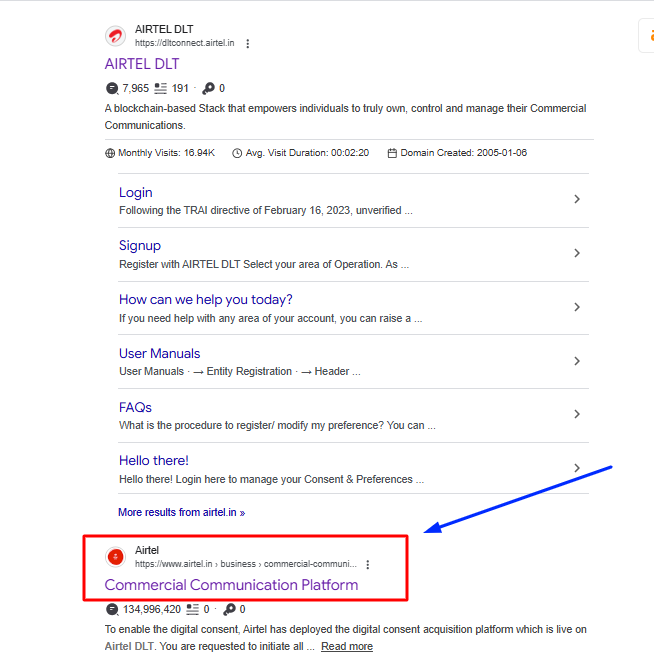
Alternative Method:
- Search "Airtel DLT" on Google
- Click on "Commercial Communication Platform" (second result typically)
- Look for "New Registration" link

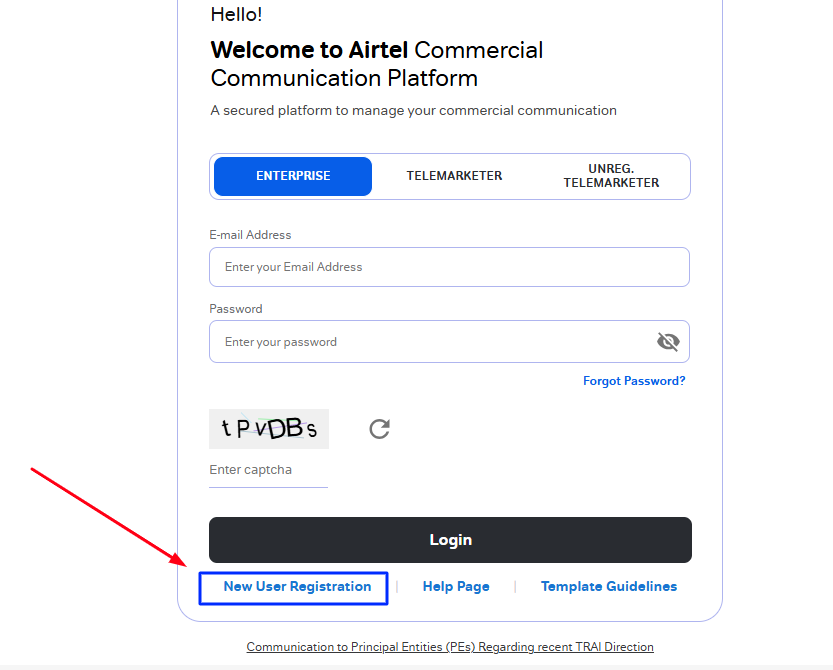
Step 2: Select Registration Category
A selection screen appears with two options:
Option A: As Enterprise
- Select this if you're a business sending your own messages
- For companies, proprietorships, NGOs, government departments
- Definition shown: "A commercial business (individual or company) dealing with products or services, who would like to communicate with their customers through SMS or voice"
Option B: As Telemarketer
- Select this if you're a bulk SMS service provider
- For companies sending messages on behalf of clients
- Choose between: TM Aggregator / TM Delivery / Both
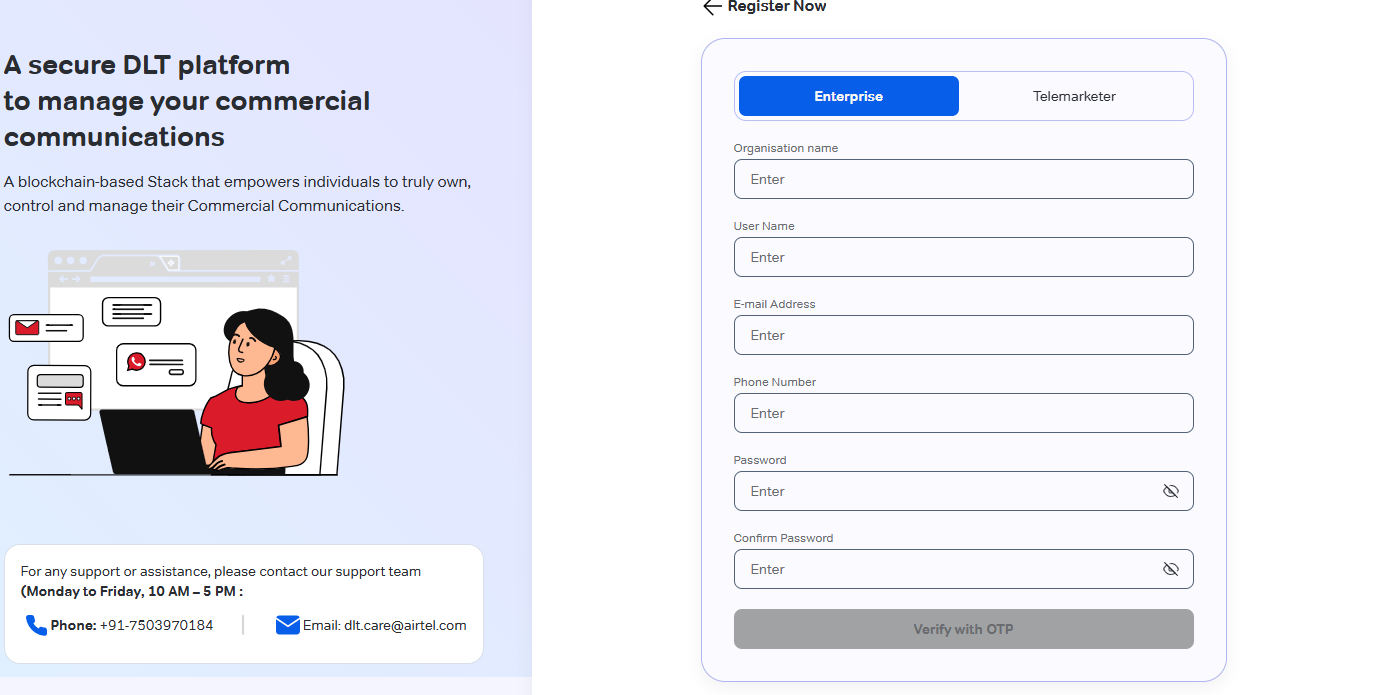
Enter Name ,Email & Mobile:
- Email Address:
- Corporate email highly recommended
- Will become your Airtel DLT login username
- Must be active and accessible
- All notifications sent here
- Example: admin@yourcompany.com
- Mobile Number:
- 10-digit number (without +91 prefix)
- Must have active connection
- Used for OTP verification
- Example: 9999999999
Click "Continue" to proceed
You must provide your organisation details in the next set of information.
Choose your preferred way of communication, voice kind, auto dialler, and communication type.
As you continue, an OTP will be sent to the email address and cellphone number you provided. After entering the OTP, click "Submit."
OTP Verification (Dual Authentication)
Critical security step—both verifications mandatory:
Mobile OTP Verification:
- You'll receive 6-digit OTP on registered mobile number
- SMS format: "Your OTP for Airtel DLT registration is 123456. Valid for 10 minutes."
- Enter OTP in first field
- OTP expires in 10 minutes
Email OTP Verification:
- Check your registered email inbox (and spam/junk folder)
- Subject: "Airtel DLT Registration - Email Verification"
- Email contains 6-digit OTP
- Enter OTP in second field
- OTP valid for 10 minutes
Creating passwords in accordance with the instructions is the following step. To continue, click submit.
Create Login Password
Set up your Airtel DLT portal login credentials:
Password Requirements:
- Minimum 8 characters
- At least 1 uppercase letter (A-Z)
- At least 1 lowercase letter (a-z)
- At least 1 number (0-9)
- At least 1 special character (@, #, $, %, *, &, etc.)
- No spaces allowed
Example Strong Passwords:
Airtel@2025MyDlt#123Sms$Gateway9
Enter password twice:
- First field: Enter new password
- Second field: Re-enter to confirm
Security Tips:
- Don't use common passwords (password123, company name, etc.)
- Store securely (password manager recommended)
- Don't share with unauthorized persons
After setting password, click "Submit"
You will get a reference number on the page that follows your submission. Keep this number handy for later.
Click now -Free Airtel DLT Registration Support – Get Help Now
Document Upload Fields:
| Document Type | Selection | File | Action |
|---|---|---|---|
| Company PAN | Dropdown: "PAN Card" | Browse & Upload | ✅ |
| Business Proof | Dropdown: Select certificate type | Browse & Upload | ✅ |
| Address Proof | Dropdown: Select proof type | Browse & Upload | ✅ |
| ID Proof | Dropdown: Select ID type | Browse & Upload | ✅ |
| Authorized Person Photo | Fixed: "Photograph" | Browse & Upload | ✅ |
| LOA | Fixed: "Authorization Letter" | Browse & Upload | ✅ |
| GST Declaration | Fixed: "GST Declaration" | Browse & Upload | ✅ |
| Document Checklist | Fixed: "Checklist" | Browse & Upload | ✅ |
Upload Steps for Each Document:
- Click document dropdown
- Select appropriate document type
- Click "Browse" button
- Select file from your computer
- Wait for upload confirmation (green checkmark)
- Verify document preview
- Repeat for all documents
Upload Guidelines:
- ✅ All documents mandatory
- ✅ File size: Less than 10 MB each
- ✅ Format: PDF preferred, JPG acceptable
- ✅ Clear and readable scans
- ✅ All text legible, no blur
- ✅ All four corners visible
- ✅ No watermarks covering critical info
Common Upload Errors:
- File too large → Compress PDF or reduce image quality
- Upload failed → Check internet connection, try different browser
- Invalid format → Convert to PDF/JPG
- Document not readable → Rescan with better quality
After uploading all documents, scroll down
Step 12: Payment Details Entry
Final step before submission:
Enter Payment Information:
- Payment Mode: Select from dropdown
- NEFT
- RTGS
- Cheque
- Demand Draft (DD)
For NEFT/RTGS:
- UTR Number: Unique Transaction Reference (16-character alphanumeric)
- Transaction Date: Date of payment
- Bank Name: Your bank name
- Amount: ₹5,900
Click now -Free Airtel DLT Registration Support – Get Help Now
Conclusion
The Airtel DLT registration process, while comprehensive, is essential for legal and uninterrupted commercial SMS communication in India. With systematic document preparation, accurate portal entries, strategic header-template planning, and proper PE-TM chain binding, your business can complete airtel dlt registration smoothly within 24-72 hours.
Airtel's premium dlt platform offers significant advantages: fastest template approvals (as quick as 30-60 minutes), most stable portal infrastructure (99.8% uptime), excellent customer support, and highest delivery rates through direct SMSC connectivity. While the dlt registration charges of ₹5,900 annually are higher than BSNL (₹3,540), the superior service quality and reliability justify the investment for businesses prioritizing message delivery and support quality.
The airtel portal login provides businesses with an intuitive dashboard for managing headers, templates, chains, and monitoring campaign performance. Whether you choose the DIY route or prefer expert assistance from a trusted bulk sms provider like SMSGatewayHub, ensuring DLT compliance is non-negotiable for any business leveraging SMS marketing in 2026.
Non-compliant messages face immediate blocking, potential regulatory penalties from TRAI, damage to brand reputation, and loss of customer trust. With proper dlt registration airtel and a reliable SMS gateway partner, your business can leverage SMS marketing's impressive 98% open rate and instant delivery to drive engagement, conversions, and customer loyalty—all while staying 100% compliant with TRAI's TCCCPR 2018 regulations.
Need personalized guidance? Our expert team at SMSGatewayHub is ready to help you navigate Airtel DLT registration and launch high-performing SMS campaigns. Get started today!
📧 support@smsgatewayhub.com | 📞 +91-9907922122 | 🌐 www.smsgatewayhub.com
DLT Registration: Step-by-Step for All Operators
Airtel DLT Registration Guide
BSNL DLT Registration Guide
Jio DLT Registration Guide
VIL DLT Registration Process Guide
SmartPing DLT Registration Process Guide