
Complete Guide to Videocon DLT Registration: SmartPing DLT Process, Documents & Charges Explained
In today's digital marketing landscape, bulk SMS remains one of the most effective communication channels for businesses. However, if you're planning to send promotional or transactional SMS to your customers, DLT registration is not just recommended—it's mandatory. Without proper DLT approval, you cannot legally send bulk SMS in India.
This comprehensive guide will walk you through everything you need to know about Videocon DLT registration, the SmartPing DLT login process, required documents, registration charges, and how to successfully complete your telemarketing registration process.
👉 Get Free Demo | 👉 Talk to Bulk SMS Expert | 👉 Start Sending SMS Now
Contact SMSGatewayHub:
📞 Call: +91-9907922122
📧 Email: support@smsgatewayhub.com
🌐 Visit: www.smsgatewayhub.com
What is DLT Registration?
DLT (Distributed Ledger Technology) registration is a regulatory framework implemented by TRAI (Telecom Regulatory Authority of India) to curb unsolicited commercial communication. The DLT registration process requires all businesses and telemarketers to register their entities, obtain approval for message headers, and get templates verified before sending any bulk SMS.
Think of it as a digital passport for your business communications—without it, your messages simply won't reach your customers.
Bulk SMS at ₹0.11 per SMS : Cheapest Bulk SMS in Market -SMSGatewayHub
Why Choose SmartPing for DLT Registration?
When it comes to DLT registration Videocon or SmartPing DLT registration, many platforms are available including Jio Tele-Verification, Airtel DLT, and others. However, SmartPing (operated by Videocon) stands out for several reasons:
- Faster approval timelines: Template approval typically takes 2-3 days
- User-friendly interface: Simple SmartPing login and navigation
- Comprehensive support: Dedicated PingConnect support team
- Reliable SMS gateway: Robust Videocon SMS gateway infrastructure
- Transparent pricing: Clear DLT registration charges with no hidden fees
Get FREE SMS API - SMSGATEWAYHUB Developer SMS API Documentation
Documents Required for DLT Registration
Before starting your DLT portal registration, ensure you have all necessary documents ready. The documents required for DLT registration vary based on your business type:
For Private Limited Companies:
- Certificate of Incorporation
- Company PAN Card
- Letter of Authorization (LOA) from competent signatory
- GST Certificate (optional but recommended)
For Partnerships & Sole Proprietorships:
- Partnership Deed or MSME Registration
- PAN Card (business or individual)
- Authorization letter for DLT registration from competent signatory
- GST Certificate or Shop & Establishment License
Important Note on LOA:
The letter of authorization for DLT registration is crucial. This document authorizes a specific person to handle DLT operations on behalf of your company. The letter showing authorized signatory DLT must include:
- Company letterhead
- Authorized person's full name and designation
- Explicit authorization statement
- Company seal and signature of competent signatory
- Date of issuance
Many businesses struggle with creating the correct DLT authorization letter format. The letter must clearly state that the authorized person can submit DLT applications, manage headers, templates, and handle all DLT-related operations.
Step-by-Step Videocon DLT Registration Process
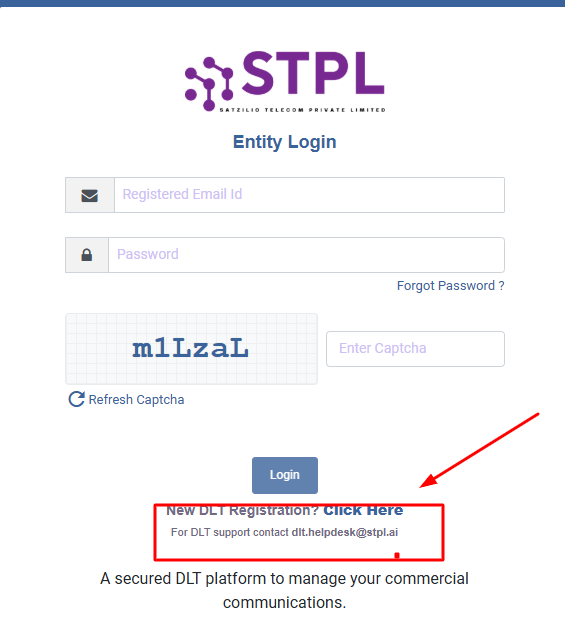
Step 1: Access the SmartPing Portal
Open your browser and search for "SmartPing" or directly visit the PingConnect website. On the homepage, you'll find the New DLT Registration option prominently displayed.

Step 2: Choose Registration Type
Click on "New Registration" (not "Enroll Entity" which is for existing DLT users migrating platforms). This initiates your new telemarketer registration process. 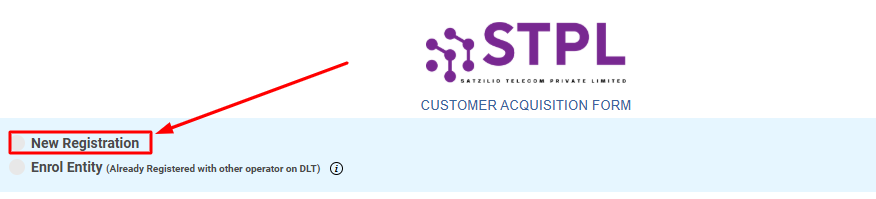
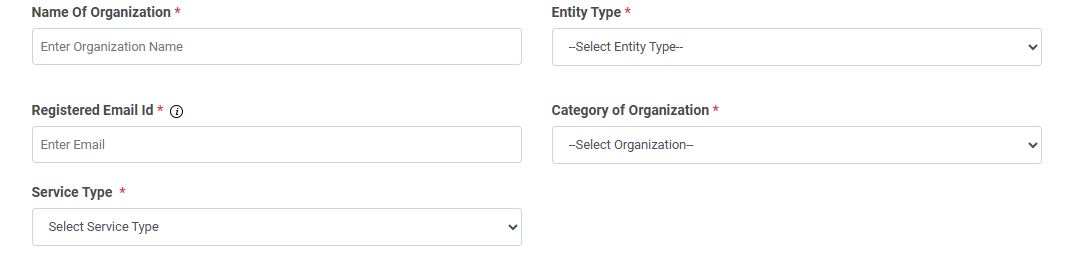
Step 3: Fill Organization Details
The DLT application form requires comprehensive information:
- Name of Organization: Enter your registered business name exactly as it appears on official documents
- Entity Type: Select from Private Limited, Partnership, Sole Proprietorship, or LLP
- Registered Email ID: Use an official business email
- Category of Organization: Choose the most relevant category (Education, Finance, E-commerce, etc.)
- Service Type: Select SMS, Voice, or both based on your communication needs
Critical Update: Individual DLT registration is no longer permitted by TRAI. You must have a registered business entity to complete the DLT registration SmartPing process.
Step 4: Enter Address Information
Provide your complete registered address. If your current operational address matches your registered address, you can check "Same as Current Address." Ensure the address matches exactly with your submitted documents to avoid rejection.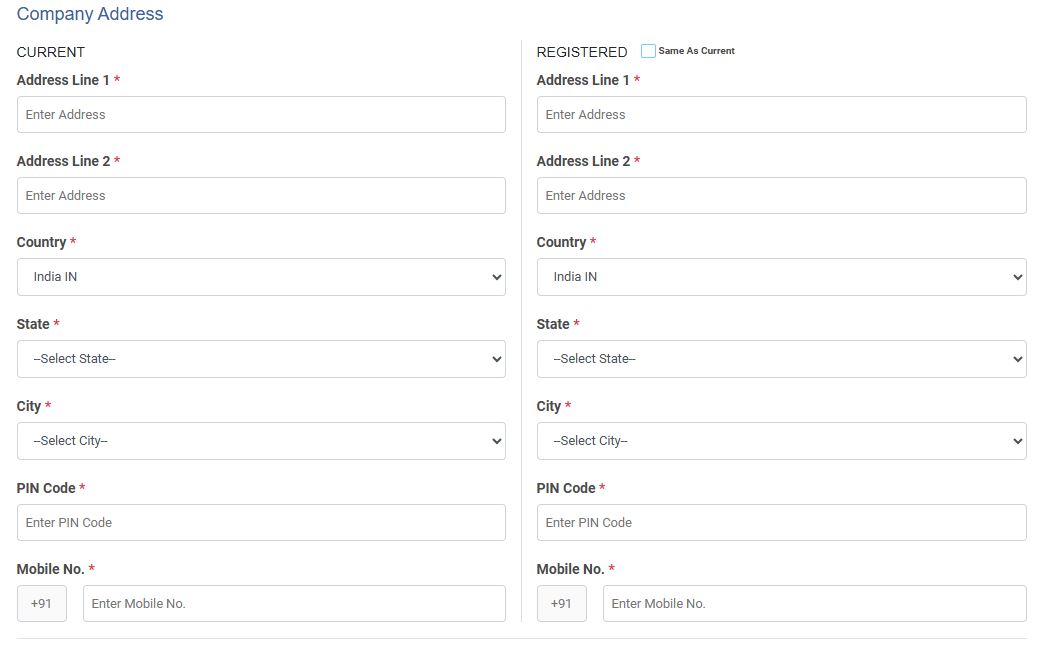
Step 5: Authorized Person Information
This section requires details about the person authorized via the LOA:
- Full name of authorized person
- Designation (must match the LOA)
- Email ID
- Mobile number (will require OTP verification)
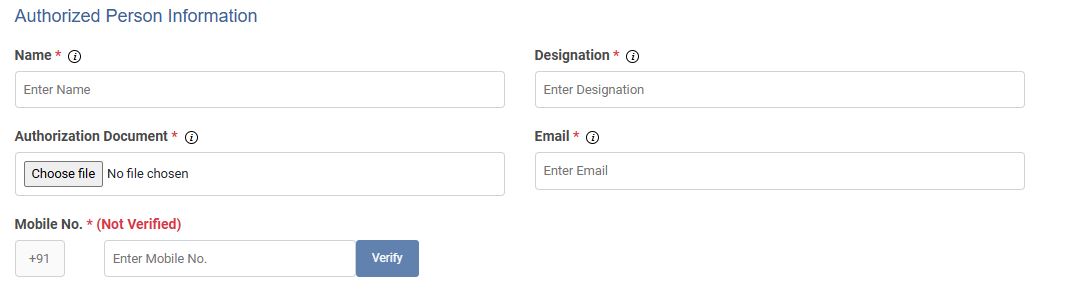
Upload the letter for DLT registration from competent signatory PDF here. The file must be in PDF format, maximum 2MB. If your file exceeds this limit, use a PDF compressor to reduce the size while maintaining readability.
Step 6: PAN Verification
Enter your company PAN number and verify it. For sole proprietorships, use your personal PAN. After verification, upload a clear image of the PAN card (JPG or PNG format, under 100KB).
Pro Tip: When compressing images, ensure they remain legible. Over-compressed documents are a common reason for application rejection.
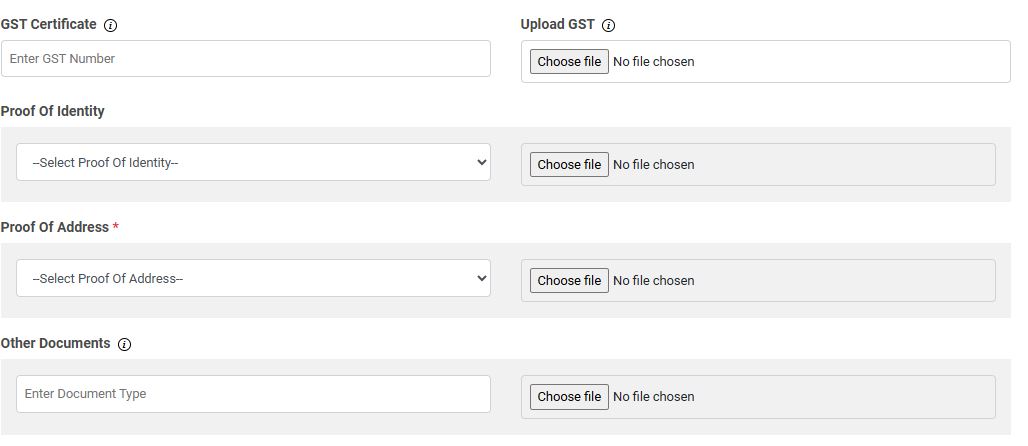
Step 7: Upload Supporting Documents
- Proof of Identity: Upload PAN Card
- Proof of Address: Upload Certificate of Incorporation, GST Certificate, or Shop & Establishment License
- Additional documents (if applicable)
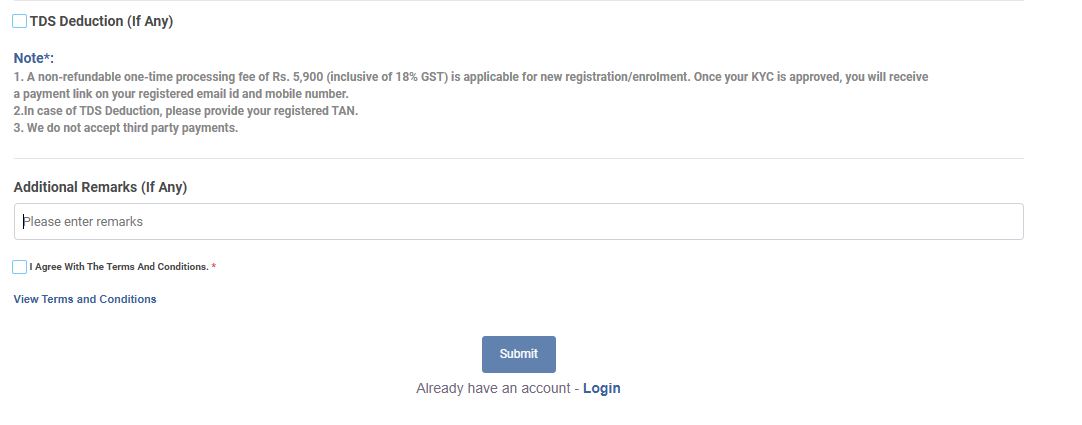
Step 8: Review and Submit
Add any relevant remarks (optional), agree to the terms and conditions, and click Submit. You'll receive a confirmation message: "Registration application submitted successfully. Please verify your email."
Step 9: Email Verification
Check your registered email for a verification link from SmartPing. Click the link to verify your email address—this is a mandatory step in the DLT process.
DLT Registration: Step-by-Step for All Operators
Airtel DLT Registration Guide
BSNL DLT Registration Guide
Jio DLT Registration Guide
VIL DLT Registration Process Guide
Videocon DLT Registration Charges
Once your documents are reviewed and approved by the SmartPing KYC team, you'll receive a payment link. The DLT registration fees are:
- Base Registration Fee: ₹5,000
- GST (18%): ₹900
- Total DLT Registration Charges: ₹5,900
Payment Warning: The payment must be made from your registered business bank account only. Payments from third-party accounts will result in application rejection, and you'll need to restart the entire process.
DLT Registration Validity
Many businesses ask, "Is DLT registration free?" The answer is no—there's a one-time registration fee. Regarding DLT registration validity, your registration remains active as long as you maintain compliance. However, be aware of DLT renewal charges which may apply for annual maintenance or if you need to update information.
After Payment: What Happens Next?
Once payment is processed:
- You'll receive SmartPing entity login credentials via email
- Use these credentials for SmartPing live login
- Access the SmartPing telemarketer login portal
- Submit your header registration (sender ID)
- Create and submit message templates for DLT approval for SMS
The DLT approval process for headers and templates typically takes 2-3 working days. You'll receive confirmation once your DLT approval is granted, allowing you to begin sending bulk SMS through the Videocon SMS gateway or your chosen SMS panel registration.
Understanding DLT Entity ID and DLT Certificate
After successful registration, you'll receive:
- DLT Entity ID: A unique identifier for your business on the DLT platform
- DLT Certificate: Digital proof of your registration status
You'll need to share your DLT entity ID with your SMS service provider (like SMSGatewayHub) to configure your SMS gateway registration and start sending compliant bulk messages.
SmartPing Support and Assistance
If you encounter issues during Videocon DLT login or the registration process, PingConnect support is available to assist. You can also check your SmartPing status by logging into the portal or contacting Ping Connect customer care.
For businesses using other platforms like Smsgatewayhub DLT registration or considering alternatives like Jio DLT registration process, the document requirements and basic process remain similar across all platforms.
Conclusion
Understanding how to do DLT registration is essential for any business planning to leverage bulk SMS marketing. The SmartPing DLT platform offers a streamlined, efficient process for obtaining your DLT register status and compliance certification.
By following this guide, preparing the correct documents including the letter of authorization (LOA), and understanding the DLT registration means and requirements, you can successfully complete your registration and start sending compliant, effective bulk SMS campaigns.
Ready to start your DLT registration journey? At SMSGatewayHub, we help businesses navigate the entire DLT compliance process and provide robust SMS gateway solutions for your marketing needs. Contact us today for personalized assistance with your how to get DLT registration queries and seamless integration with SmartPing or other DLT platforms.
Disclaimer: DLT registration processes and charges may be updated by TRAI or service providers. Always verify current requirements on the official SmartPing website before starting your registration.
👉 Get Free Demo | 👉 Talk to Bulk SMS Expert | 👉 Start Sending SMS Now
Contact SMSGatewayHub:
📞 Call: +91-9907922122
📧 Email: support@smsgatewayhub.com
🌐 Visit: www.smsgatewayhub.com