OTP Service in India - What is OTP and How Does It Work? Complete Guide 2025
Every time you shop online, login to your bank, or use WhatsApp, you receive a mysterious 6-digit code on your phone.
That code? It's called OTP.
Many people don't understand what OTP is or why they need it. Some think it's spam. Others don't know it protects their account from hackers!
In this guide, I'll explain OTP in simple terms. You'll learn:
- What OTP means
- How it works step-by-step
- Why it's important for security
- How businesses in India use OTP
- How to choose an OTP service provider
By the end, you'll be an OTP expert! Let's go! 👇
OTP - Full Form & Simple Meaning
What is OTP?
OTP = One Time Password
Let me break it down: One = Single, only once Time = Use it only one time Password = Secret code to verify you
So OTP = A secret code you use only ONE time.
Simple Real-Life Example
Imagine this:
You: "Hey bank, I want to transfer ₹5000"
Bank: "Wait! Prove it's really you. I'm sending you a secret code."
You: "I got code 247385"
Bank: "Correct! It's really you. Money transferred!"
That secret code (247385) = OTP
Why "One Time"?
The code expires after:
- 2-5 minutes (usually)
- OR after you use it once
- OR after you enter wrong code 3 times
This means:
- Hacker cannot use old OTP
- Each login needs new OTP
- Very secure! 🔒
How OTP Works (Step-by-Step)
The Complete OTP Process
Let me show you exactly what happens when you login online:
Step 1: You Enter Phone Number
Step 2: System Generates Random Code
Step 3: SMS Sent to Your Phone
Step 4: You Receive SMS
Step 5: You Enter the Code
Step 6: Server Verifies
Step 7: Verification Successful!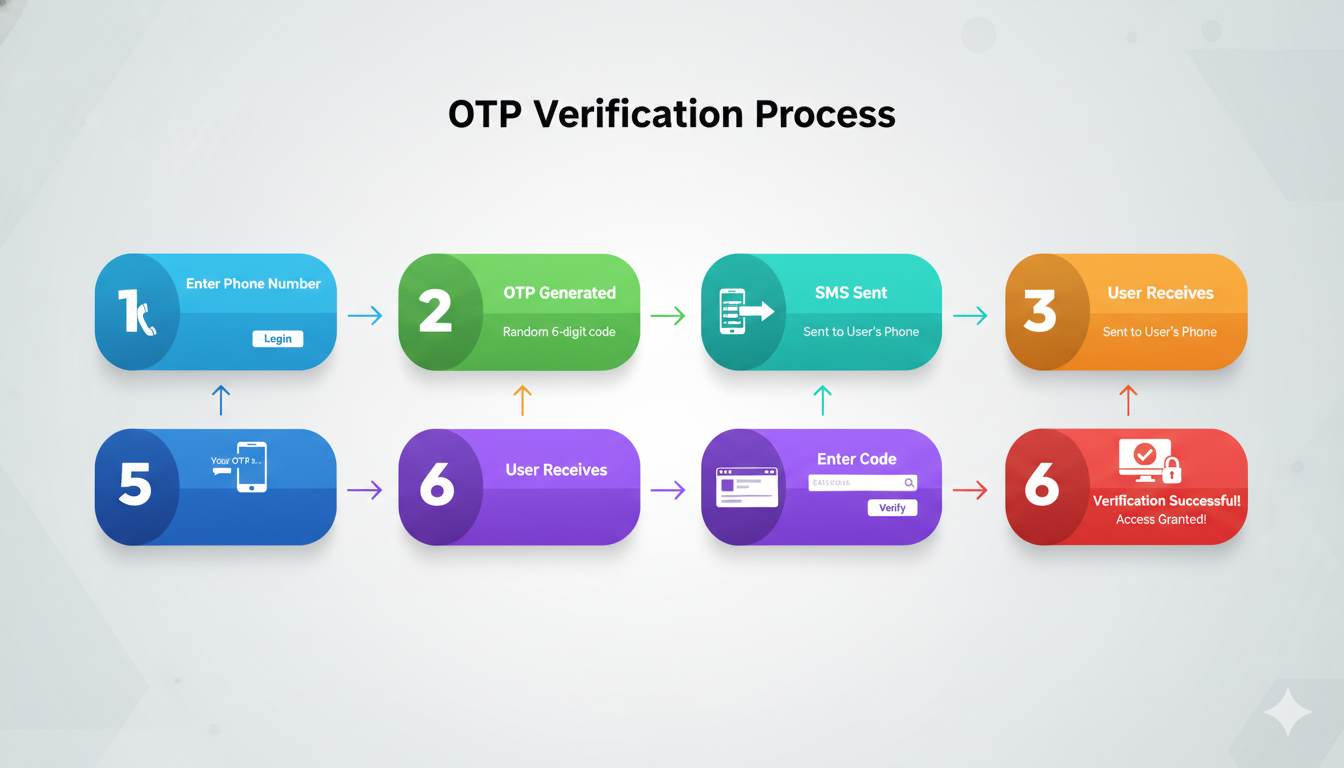
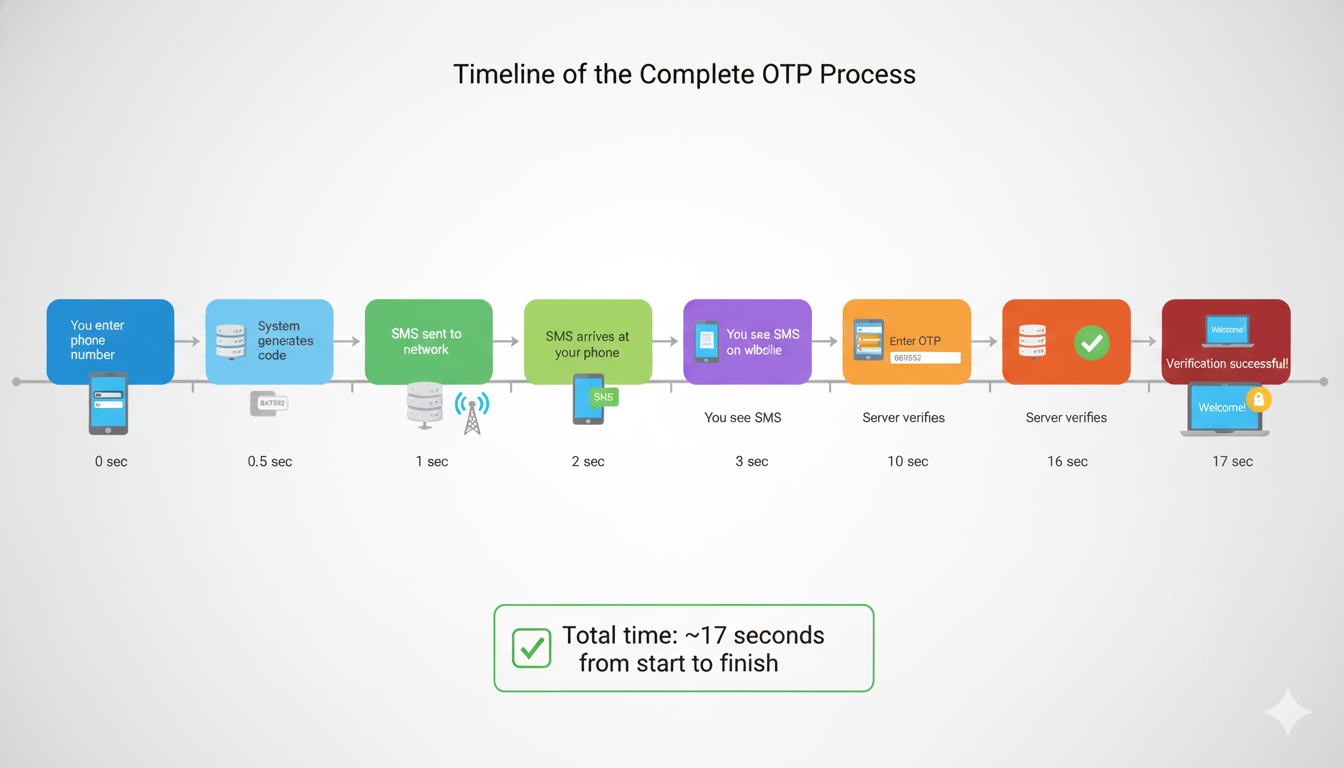
Timeline of OTP Process
Types of OTP
There are 4 main types of OTP used in India:
Type 1: SMS-Based OTP (Most Common)
How it works:
- Code sent via SMS text message
- You read on your phone
- Most popular in India
Advantages:
- Works on any phone (old or new)
- No internet needed
- Very fast delivery
- Everyone has SMS
Disadvantages:
- Can be intercepted (rare)
- Delivery delay in bad network
Used by:
- Banks (ICICI, HDFC, Axis)
- E-commerce (Amazon, Flipkart)
- Government services
- 95% of India services
Example:"Your ICICI OTP is 645892. Valid for 10 minutes.
Do not share with anyone."
Type 2: Email-Based OTP
How it works:
- Code sent via email
- You login and check email
- Click link or enter code
Advantages:
- More secure (email is more private)
- Code visible in email history
- Works without phone
Disadvantages:
- Slower delivery (1-5 minutes)
- Need to open email app
- Needs internet connection
Used by:
Example:From: security@google.com
Subject: Verify your identity
Your Google verification code is: 483729
This code expires in 10 minutes.
Type 3: App-Based OTP (Most Secure)
How it works:
- Download special app (Google Authenticator, Microsoft Authenticator)
- App generates 6-digit code automatically
- Code changes every 30 seconds
- No internet needed
Advantages:
- Most secure (not sent via SMS)
- Code never visible to hackers
- Works without internet
- Code changes automatically
Disadvantages:
- Need to install app
- More complicated for old users
- Can lose access if phone lost
Used by:
- Banking apps
- Gmail/Google
- Cryptocurrency exchanges
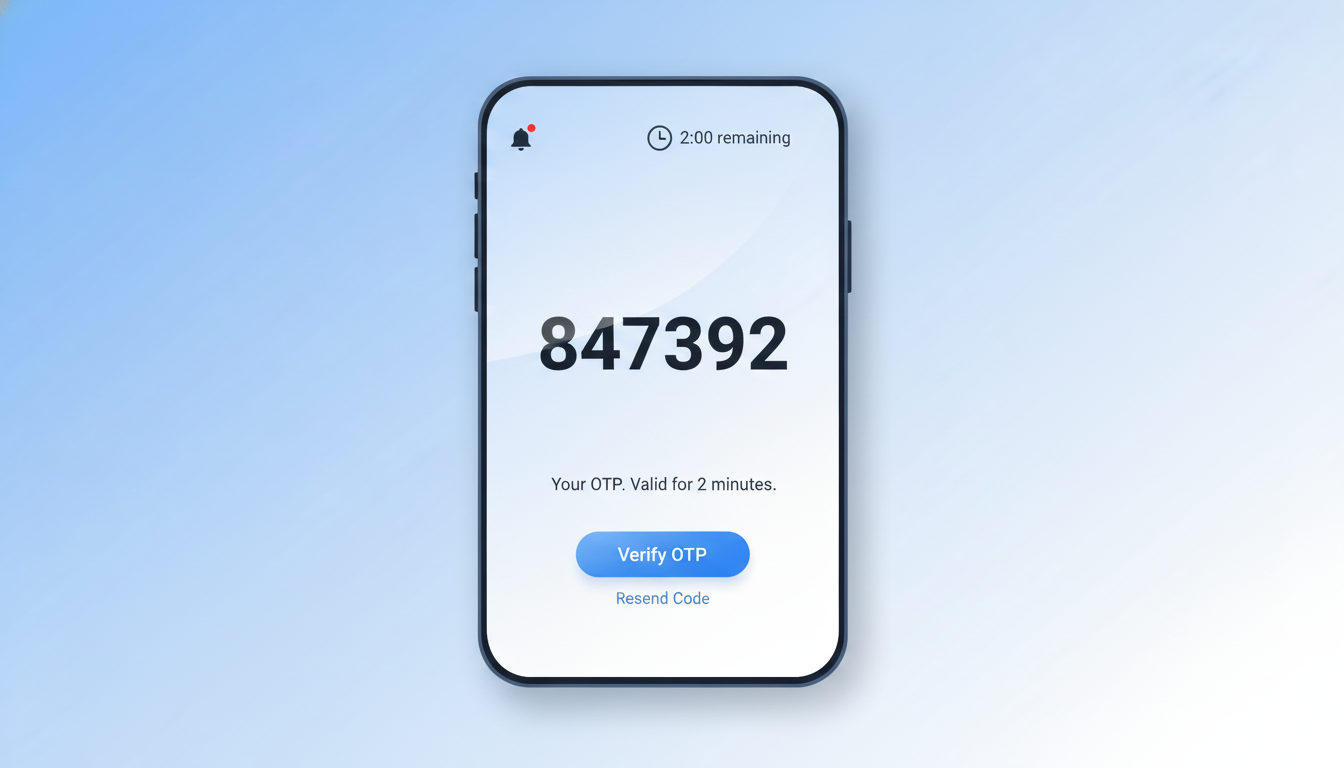
Example:App shows: 847392 (valid for 30 sec)
After 30 sec: 392847 (new code)
Continuously changing
Type 4: Voice Call OTP (Least Used)
How it works:
- Service calls your phone
- Robot voice speaks the code
- You listen and remember
- Enter code on website
Advantages:
- Works without reading
- Helpful for visually impaired
- No SMS needed
Disadvantages:
- Slow and annoying
- Hard to hear code clearly
- Not available on all phones
- Takes 5+ minutes
Used by:
- Some banks (backup option)
- Government services
- International services
- Insurance companies
Example:Phone rings → Robot: "Your verification code is
Seven Four Nine Six Two Eight.
Repeat: Seven Four Nine Six Two Eight."
.png)
Why OTP is Important (Security)
Without OTP - What Happens?
Scenario: Hacker gets your passwordHacker knows your password: abc@123
Hacker tries to login to your bank
Bank: "Login successful"
Bank: "Who is this? Where are you?"
Bank: "IP address is from USA (you're in India)"
Bank: "But no OTP check!"
DISASTER! Hacker accesses your account! 💀
With OTP - What Happens?
Scenario: Hacker gets your password BUT NO OTPHacker knows password: abc@123
Hacker tries to login to bank
Bank: "Password correct"
Bank: "Now send OTP from your phone"
Hacker: "I don't have his phone!"
Bank: "OTP not verified. Access denied!" 🚫
Your account is SAFE! ✅
Real Statistics
According to cybersecurity reports:
| Protection | Account Hack Risk |
|---|---|
| Password only | 60% chance hacker wins |
| Password + OTP | 1% chance hacker wins |
| Password + OTP + App-based | 0.1% chance |
OTP reduces hacking by 99%!
Why OTP is Important (Legal Requirement)
TRAI Rules in India
TRAI (Telecom Regulatory Authority of India) made OTP mandatory for:
- Bank logins
- Payment transactions
- Account changes
- Money transfers
- Sensitive operations
RBI Guidelines
Reserve Bank of India (RBI) requires:
- Banks must use OTP for all online transactions
- OTP must be less than 5 minutes validity
- OTP code must be unique
- OTP must not be reusable
Government Mandate
Government of India requires:
- E-commerce platforms to use OTP
- Government services to use OTP
- Telecom operators to provide OTP
- Digital transaction security
Non-compliance = ₹50,000 to ₹1 lakh fine 💰
Recommended Reads -
Best Bulk SMS Provider by City
- Best Bulk SMS Service in Chennai
- Get the Best Bulk SMS Provider in Mumbai
- Affordable Bulk SMS Services in Delhi
Best Bulk SMS Provider by Industry
- Best Bulk SMS Service Providers in India for Educational Institutes
- Best SMS Marketing Solutions for Healthcare Providers in India
- Bulk SMS Services for Transport Industry
- Bulk SMS Service for Logistics
- Improve Life Insurance Retention
- Real Estate Lead Generation with Bulk SMS India
How Businesses in India Use OTP
Use Case 1: Banks & Financial Services
Why they use OTP:
- Protect customer money
- Legal requirement
- Prevent fraud
- Build customer trust
When OTP is sent:
- Login to online banking
- Before money transfer
- Before changing password
- Before updating contact details
Example Flow:Customer: "I want to transfer ₹10,000"
Bank: "Verify yourself. OTP sent to 98765XXXX43"
Customer: "Received OTP: 492847"
Bank: "Verified! Money transferred!"
Banks using OTP: ICICI, HDFC, Axis, SBI, Yes Bank, Kotak
Use Case 2: E-Commerce (Amazon, Flipkart, Myntra)
Why they use OTP:
- Prevent fake orders
- Protect customer account
- Verify phone number
- Build trust
When OTP is sent:
- First login
- Before checkout
- When changing password
- Before payment
Example Flow:Customer: "I want to buy phone"
Amazon: "Verify your phone number"
Customer: Receives OTP 638291
Amazon: "Verified! Proceed to payment"
Customer: Completes order
E-commerce using OTP: Amazon, Flipkart, Myntra, Meesho, Snapdeal
Use Case 3: Apps (WhatsApp, Telegram, Instagram)
Why they use OTP:
- Prevent account takeover
- Verify new phone number
- Secure user accounts
- Prevent impersonation
When OTP is sent:
- First login
- New device login
- Account recovery
- Phone number change
Example Flow:User: "I want to login on new phone"
WhatsApp: "Verify this device"
User: Receives OTP 847392
WhatsApp: "Verified! You're logged in "
Apps using OTP: WhatsApp, Telegram, Instagram, Facebook, Twitter
Use Case 4: Government Services
Why they use OTP:
- Citizen verification
- Legal requirement
- Prevent fraud
- Secure services
When OTP is sent:
- Aadhar verification
- Passport application
- Tax filing
- Government subsidy
- Ration card application
Example Flow:Citizen: "I want to verify Aadhar"
Uidai: "OTP sent to registered phone"
Citizen: Enters OTP 294857
Uidai: "Verified! Aadhar confirmed ✅"
Government services using OTP: Aadhar, Passport, ITR, PF, GST, Ration Card
Use Case 5: Cryptocurrency & Trading
Why they use OTP:
- Protect digital assets (very important!)
- Prevent hacking
- High-value accounts
- Regulatory requirement
When OTP is sent:
- Login
- Before withdrawal
- Before transfer
- Before enabling 2FA
Example Flow:Trader: "I want to withdraw crypto"
Exchange: "Verify yourself. OTP sent"
Trader: Enters OTP 629384
Exchange: "Verified! Withdrawal approved ✅"
Crypto using OTP: Binance, Coinbase, Upstox, Shoonya
Use Case 6: Healthcare & Insurance
Why they use OTP:
- Protect patient privacy
- Verify identity
- Legal compliance
- Prevent fraud
When OTP is sent:
- Booking appointments
- Accessing medical records
- Claiming insurance
- Prescription downloads
Example Flow:Patient: "I want to view health records"
Hospital: "OTP sent to 98765XXXX43"
Patient: Enters OTP 847293
Hospital: "Verified! Here are your records ✅"
Healthcare using OTP: Apollo, Fortis, Telemedicine apps, Insurance websites
Read More -DLT Registration in India - Complete Step by Step Guide 2025
How to Choose OTP Service Provider
What to Look For
| Factor | Why Important | Good vs Bad |
|---|---|---|
| Delivery Speed | Slow OTP = user frustration | Good: <2 sec, Bad: >10 sec |
| Reliability | Missed OTP = failed transaction | Good: 99%+, Bad: <95% |
| Price | Affects business profit | Good: ₹0.50-1 per OTP, Bad: >₹2 |
| Support | Issues need quick fix | Good: 24/7, Bad: Business hours only |
| Compliance | Legal requirement | Good: DLT registered, Bad: Unregistered |
| Features | Additional functionality | Good: API, Dashboard, Reports, Bad: SMS only |
OTP Statistics & Growth in India
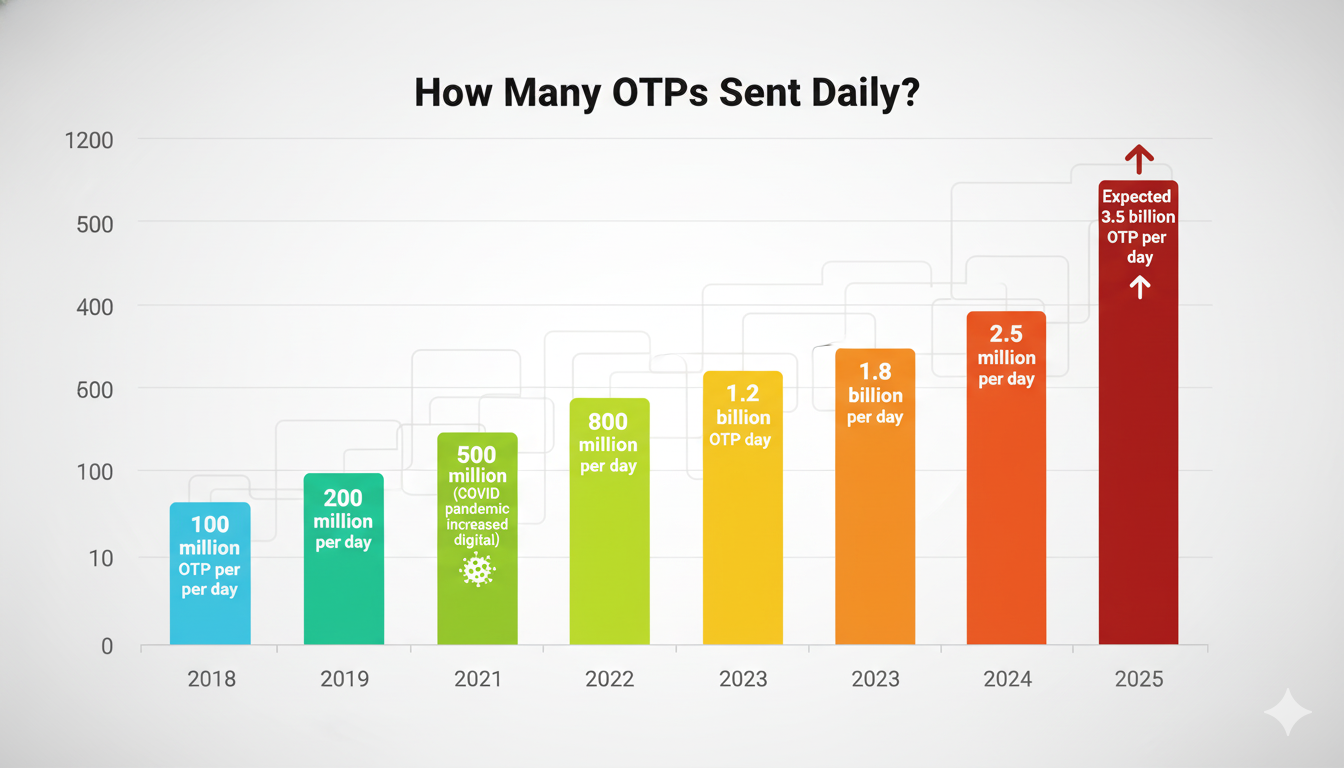
How Many OTPs Sent Daily?
Industry-Wise OTP Usage
| Industry | % of OTP |
|---|---|
| Banking & Finance | 35% |
| E-commerce | 30% |
| Government | 15% |
| Apps & Social Media | 15% |
| Others | 5% |
Total = 2.5 billion OTP per day in 2024
Growth Reasons
- Smartphone adoption - 600+ million smartphones in India
- Digital payments - UPI, Cards, Digital wallets
- Government push - Aadhar, Digital India
- Security awareness - Users understand value
- Online shopping - E-commerce boom
- Banking apps - Banking digitization
OTP Risks & Safety Tips
Risks (Know These!)
Risk #1: OTP Interception
- Hacker can intercept SMS
- Man-in-middle attack
- Prevention: Use app-based OTP
Risk #2: Phishing
- Fake website steals OTP
- You enter OTP on fake site
- Prevention: Never share OTP with anyone
Risk #3: SIM Swap
- Hacker convinces telecom to change SIM
- Hacker gets your OTP
- Prevention: Use app-based 2FA
Risk #4: Shared Device
- You use shared computer
- Hacker sees OTP typed
- Prevention: Use personal device
Safety Tips (Follow These!)
✅ DO:
- Keep phone secure
- Don't share OTP with anyone
- Use strong password + OTP together
- Enable app-based 2FA
- Update phone security
- Report suspicious activity
❌ DON'T:
- Write OTP on paper
- Share OTP with "customer service" (nobody asks legitimately)
- Use old/used phones for OTP
- Share phone with strangers
- Click links in OTP SMS
- Ignore suspicious OTP requests
Related Resources - Where to Buy OTP SMS Solutions in India
Common OTP Problems & Solutions
Problem #1: OTP Not Received
Causes:
- Bad mobile network
- Operator server issue
- Phone blocked SMS
- Wrong number registered
Solutions:
- Wait 2-3 more minutes
- Check spam/junk folder
- Request new OTP
- Restart phone
- Contact support
Prevention:
- Register correct phone number
- Keep phone on
- Good network signal
Problem #2: OTP Expired
What happens:
- OTP valid for 5 minutes
- After 5 min, code expires
- Code won't work anymore
Solutions:
- Request new OTP (usually free)
- Enter new code within 5 minutes
- Don't delay in entering
Prevention:
- Have phone ready before requesting OTP
- Be prepared to enter quickly
Problem #3: Wrong OTP Entered
What happens:
- You enter wrong code
- After 3 wrong attempts, locked out
- Cannot retry for 30 minutes
Solutions:
- Wait 30 minutes
- Request new OTP
- Enter correct code carefully
- Contact support if repeated
Prevention:
- Carefully read OTP
- Double-check before entering
- Copy-paste if possible
Problem #4: Multiple OTPs Received
What happens:
- You requested 1 OTP
- Received 2-3 different codes
- Which one to use?
Solutions:
- Use the LATEST OTP (most recent)
- Ignore old codes
- First code is usually older
Prevention:
- Don't request OTP multiple times
- Wait before requesting again
- Only request once per attempt
Problem #5: OTP Received but Not Requested
What happens:
- You receive OTP
- You didn't request it
- Hacker trying to access account!
Solutions:
- DO NOT SHARE OTP
- Change password immediately
- Contact bank/service
- Enable 2-factor authentication
- Report suspicious activity
Prevention:
- Nobody should have your OTP
- Report unusual OTP immediately
- Enable alerts for account access
You May Also Like - Best Bulk SMS Provider for Startups in India
OTP Integration for Businesses
If You're a Business Owner
If you run a business and want to use OTP, here's what you need:
Option 1: Use Ready-Made Platform
- Shopify, WooCommerce, Magento
- Built-in OTP feature
- Easy setup (no coding)
Option 2: Use OTP Service Provider API
- SMSgatewayHub Free API
- API integration needed
- More customization
Option 3: Hire Developer
- Custom development
- Expensive (₹20,000-50,000)
- Most flexible
Integration Steps
Step 1: Choose OTP provider Step 2: Get API credentials Step 3: Share credentials with developer Step 4: Developer integrates OTP Step 5: Test with real numbers Step 6: Launch!
Time: 2-4 weeks Cost: ₹0-50,000 depending on option
Related Resources - Buy OTP India Online to Ultimate SMS API Gateway
Future of OTP in India
What's Coming?
2026-2027:
- More businesses adopt OTP
- App-based OTP becomes standard
- Blockchain-based OTP
- Facial recognition + OTP (dual security)
- AI-based fraud detection
2028+:
- Biometric OTP (fingerprint)
- Completely password-free
- OTP becomes invisible to users
- Multi-channel OTP
Cost of OTP Service
Pricing Models
Model 1: Pay Per OTP
- Cost: ₹0.16-0.25 per OTP
- Best for: Low volume businesses
- Example: 10,000 OTP/month = ₹5,000-20,000
Model 2: Monthly Plans
- Cost: ₹1,000-10,000 per month
- Includes: Fixed quota (e.g., 100,000 OTP)
- Best for: Medium businesses
- Example: 100,000 OTP included in ₹5,000 plan
Model 3: Enterprise Plans
- Cost: ₹20,000-100,000+ per month
- Includes: Unlimited OTP, priority support, custom features
- Best for: Large companies
- Example: Banks, e-commerce giants
Get Today price - Bulk SMS OTP SMS Pricing
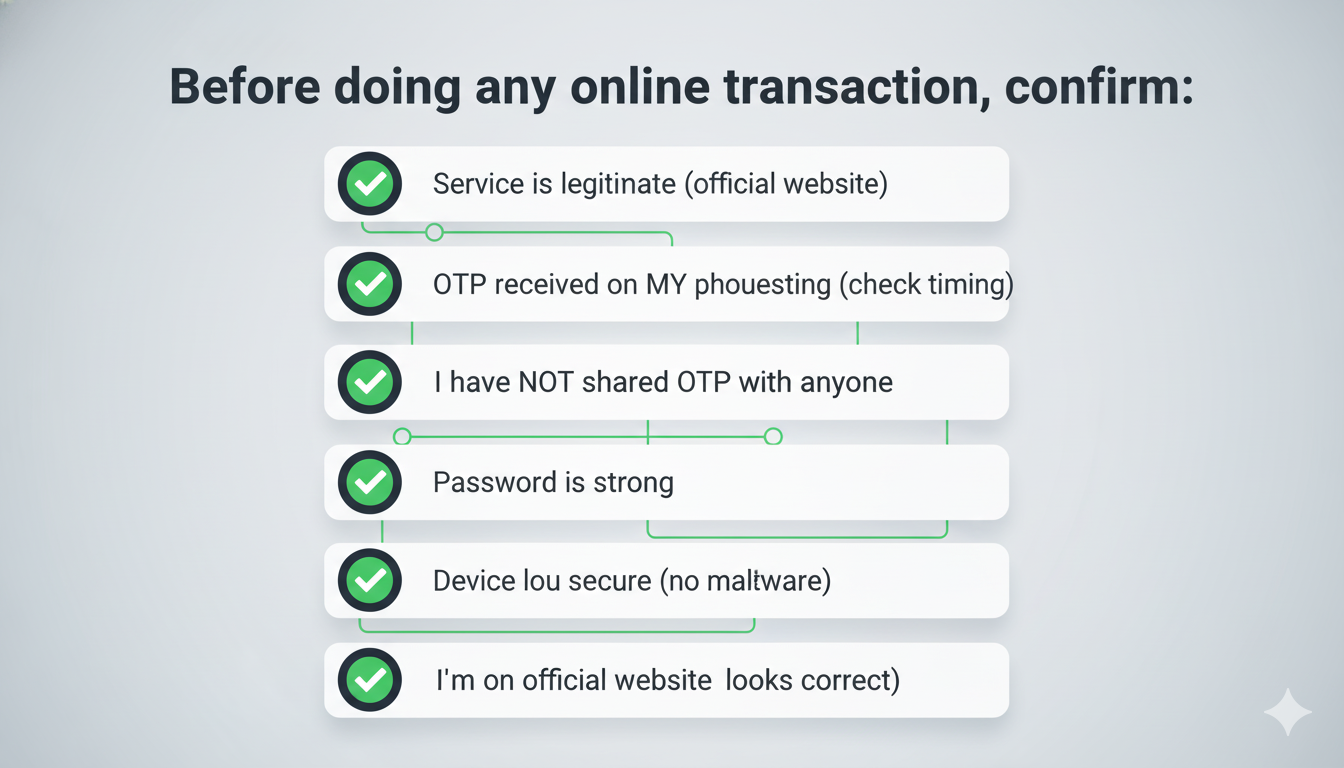
FINAL CHECKLIST: OTP Safety
If ANY of these is wrong, STOP and verify!
CONCLUSION
OTP might seem like just a code, but it's your digital bodyguard!
It protects:
- Your money 💰
- Your privacy 🔒
- Your account 👤
- Your identity 🪪
Every time you see OTP, remember:
- It's protecting you
- It's legal requirement
- It's your security
- Use it carefully
Stay safe online! 🔐
ABOUT THE AUTHOR
This guide is written by SMSgatewayHub - India's trusted OTP service provider since Oct 2010.
We send 100 million+ OTP daily to protect Indian citizens and businesses.
Need help with DLT registration? 📞 Call: +91-9907922122 📧 Email: support@smsgatewayhub.com
RELATED ARTICLES
After reading this, read our other guides: